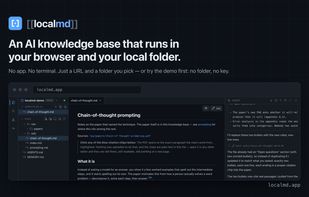
localmd is an AI knowledge base that runs entirely in a browser tab and in a folder you pick on your own disk. There is nothing to install and no account to create: you open a URL, grant access to one folder through the browser's own permission prompt, and an agent is already working in your files.
Ask a 300-page PDF or an EPUB a question and the answer comes back with citations you can click, landing on the exact paragraph, highlighted. The agent writes and links plain Markdown back into your folder, and those citations are plain text in your own files — they still work tomorrow, in any other editor, with or without localmd.
It never edits silently. Every change the agent makes lands in a review panel as a line-level diff you approve or discard; in ask-first mode nothing touches disk until you say yes.
It adapts to your folders, not the other way round. There is no import step, because there is no format to import into — point it at your Zotero storage directory, your Calibre library, the pile of PDFs in your Downloads, or a Markdown vault you already keep, and it files new material the way you already organize things.
Also included: wikilinks and backlinks, a graph view, full-text search across notes and documents, PDF and EPUB readers with annotations and block-level citations, skills you can write and reuse, a deterministic health check for broken links and orphan notes, and git — isomorphic-git running in the tab, reading and writing a real .git your terminal recognizes.
Bring your own API key: Anthropic, OpenAI, DeepSeek, Google Gemini, xAI, Groq and OpenAI-compatible providers, each called directly from the page with your own key. Keys stay in your browser and go straight to the provider you configured.
Anything you can do with your own folder and your own model is free forever, web search included — it's your key and your money, and there are no usage caps. Paid is what reaches past them: the browser extension, MCP servers, and GitHub sync. $39 once, verified offline, no account.
Requires Chrome or Edge: the File System Access API that lets a web page read and write a local folder is Chromium-only.









 yunbiao