

Lumae icon
Lumae icon

Lumae

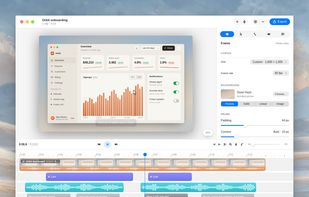
A free native Mac studio for recording displays, windows or areas, then editing with automatic click-based zooms, a redrawn cursor and motion blur. It also creates editable annotated screenshots, transcribes captions locally, records voiceovers, and stitches takes.
Lumae screenshot 1

Cost / License

  • Free
  • Proprietary

Application type

Platforms

  • Mac
0likes
0articles

Features

Properties

  1.  AI-Powered

Features

  1.  Ad-free
  2.  No registration required
  3.  Annotate Screenshot
  4.  Works Offline
  5.  Automatic Zoom
  6.  Voiceover
  7.  Screen Recording
  8.  Model Context Protocol (MCP) Support
  9.  Natural Language Processing
  10.  Motion Blur
  11.  Apple Silicon support
  12.  Automated Captions

Lumae News & Activities

Highlights All activities

Recent activities

Lumae information

Lumae was added to AlternativeTo by Paul on and this page was last updated .
No comments or reviews, maybe you want to be first?

What is Lumae?

Lumae is your free studio for polished screen recordings and screenshots.

Record raw. Ship polished.

Lumae does the parts of editing that usually eat an afternoon: where to zoom, how the cursor moves, how the frame looks, what the captions say. Screenshots get the same care.

  • Automatic zoom: Clicks close in time and space become one zoom that leads in before the first click and lingers after the last. Or place zooms by hand on the timeline and drag the preview to aim them.
  • A cursor worth watching: Lumae hides the real pointer and redraws it: a smoothed path, a lean into fast moves, a press on every click. Pick a ripple or a scale effect, or turn it off.
  • Real motion blur: Camera moves are sampled across a virtual shutter and averaged, like a real lens, not a blur filter. Exact for zooms and pans, free when the camera is still.
  • Backgrounds and frame: Solid or gradient backdrops, padding, shadow, and corners that match the recorded window's real radius, so the frame lands exactly on its edges.
  • Captions, on-device: Transcribed on your Mac with Apple's speech models, split into readable lines at sentence ends and pauses, then edited inline.
  • Voiceover and camera: Narrate over the assembled timeline while it plays, or film your camera against it. Clip audio ducks under your voice; the camera lands on its own lane, as a bubble in any corner.
  • Retake and stitch: Re-record a clip without touching the rest. Stitch recordings and imported files end to end; trim, split and reorder on the timeline.
  • Screenshots, annotated: Capture a display, a window or an area from the menu bar or a global shortcut, then mark it up: arrows, boxes, ellipses, highlights, mosaic blur, text and numbered steps. Every mark stays editable; nothing is painted on the pixels. Frame it like a recording, copy it, or export a PNG.

Let your agent record, edit and export.

Tell your AI what to change, or even what to record, and watch it happen in the editor. Works with Claude, Codex, Cursor, and other MCP clients.

  • MCP server: Add it from Settings › MCP Server, and Lumae launches itself the next time a client connects. From there an agent has the whole timeline: film a window, cut, zoom, caption, export, in whatever project you have open. Every request is one undo step, so its work comes apart the same way yours does.
  • Natural-language edits: Type what you want changed in Lumae itself. It turns that into a plan of commands, previews the result, and waits for you to approve it.