


OBS Studio
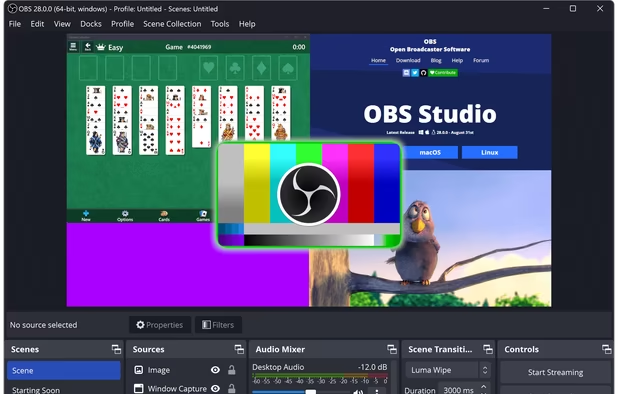
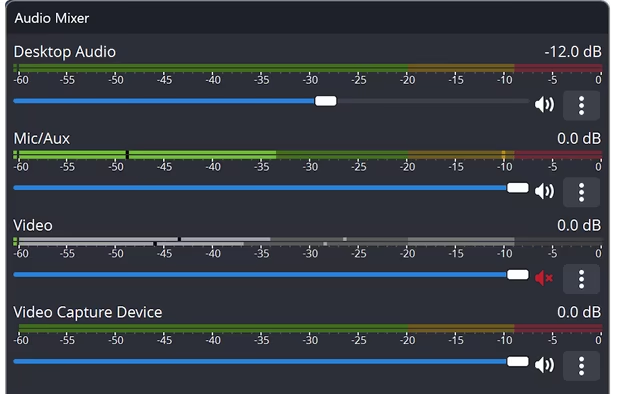
A robust cross-platform application offering seamless screen recording and live-streaming capabilities across Mac, Windows, and Linux. It supports advanced features like H264 encoding, multiple scenes, customizable themes, and direct streaming to platforms like Twitch and YouTube.
Cost / License
- Free
- Open Source (GPL-2.0)
Application typeApplication types
Platforms
- Mac
- Windows
- Linux
- BSD
- Snapcraft
- Flathub
- PortableApps.com
- Steam
- FreeBSD

Features


OBS Studio News & Activities
Recent News
- POX published news article about OBS Studio
 OBS Studio 32.2 brings easier source addition, new filter to compose SDR into HDR and more
OBS Studio 32.2 is now available as the latest release for those who rely on this open source, cros...
- POX published news article about OBS Studio
 OBS Studio 32.1 released with overhauled audio mixer, WebRTC simulcast support, and more
OBS Studio 32.1 brings several key interface updates for creators and streamers. The audio mixer ha...
- POX published news article about OBS Studio
 OBS Studio 32.0 released with new basic plugin manager, NVIDIA RTX improvements, and more
OBS Studio 32.0 is now available as the latest release of this free, open source live-streaming and...


Recent activities
 Privately-Built added OBS Studio as alternative to Scrollify
- Lunatik56 liked OBS Studio
- magicscraper liked OBS Studio
 FaulMit added OBS Studio as alternative to Captail
- Anna-Szamowska liked OBS Studio
 Mustafa-6478 added OBS Studio as alternative to VidShrink
- dvstudio80 liked OBS Studio
- william-devis liked OBS Studio
- Gooberlyv2 liked OBS Studio
 bymjj added OBS Studio as alternative to VOXO Live


Featured in Lists

This is the apps for Windows 11 that I would recommend to anyone who just got a PC ! The same list...

This is going to be a list of the free tools/software that can be used mostly in any field. it's based on websites...

These are all the software I use on my windows machine. I am privacy freak. So, I mostly use open source software....

What is OBS Studio?
OBS Studio Videos
OBS Studio information
Developed by
OBS ProjectLicensing
Open Source (GPL-2.0) and Free product.Written in
Rating
Average rating of 4.5Alternatives
240 alternatives listedNews
13 news article related to OBS StudioBadge
Get an embeddable badge for OBS StudioSupported Languages

AlternativeTo Categories
Video & Movies, Gaming Software, Photos & Graphics, Remote Work & Education, Social & Communications, System & Hardware, Audio & MusicGitHub repository
- 76,374 Stars
- 10,228 Forks
- 1144 Open Issues
- Updated


Comments and Reviews
OBS Studio is probably my favourite software of all time. You may think that OBS would be used exclusively for gaming purposes... far from it! Yes, you can easily set it up for streaming content to YouTube, Twitch, and the like, but it's also a great screen recorder software for educational videos and a great podcast recorder! It allows for extensive audio input configuration and easy stereo-mix recordings (remember that?) for a podcast session.
The software performs incredibly well even in outdated computers. My almost-10-year-old laptop can pull some recordings at lower resolutions.
still has issues with HAGS which is essensitial for DLSS 4
Whoever "worked" on the UX for this application should be fired into the sun.
Been using this free software for many years now and I've never had any serious issues. No need to worry about advertisements. No need to worry about in-app purchases. No watermark that will blemish any of your recordings. Very clean and minimalist user-interface that works well for pretty much anyone. All they need to do is make the light theme better.
Perfect for Screen recordings and has an active community helping with any issues, and plugins available so you don't need extra programs for conversion
OBS Studio is an incredible tool for recording and streaming! It's free, open-source, and packed with professional features. The flexibility to customize layouts and settings makes it suitable for beginners and pros alike. Highly recommend!
OBS Studio
I’ve been using OBS for many years, both the official version and the Steam release, and I genuinely love it. While there are still features I might not fully grasp yet, it has been an absolute lifesaver for creating videos and streaming across various platforms.
My Favorite Things About This Program:
★ Multiple Scene Possibilities ★ User-Friendly Interface ★ Completely Free ★ Available as Downloadable Software and on Steam ★ Flexible Webcam Area Selection (Shift + CTRL + ALT + Mouse Selection) ★ Extensive Source Management ★ Customizable Docks
Things I Wish Were Added:
★ Multi-Streaming to Different Platforms Without Third-Party Plugins ★ Keeping Platforms Logged In When Switching
Honestly, there aren’t many downsides to this program. I’ve enjoyed using it over the years and actively promote it on my own website. It's definitely a streaming and recording tool that I would highly recommend to anyone!