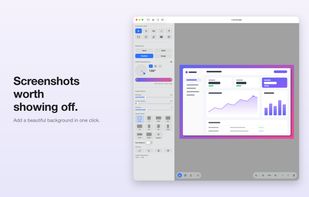
Lumescape makes your screenshots look great — right on your Mac.
Bring in a screenshot — open a file, paste, drag it in, or capture your screen — and Lumescape frames it beautifully and gets it ready to share in seconds.
BEAUTIFUL BACKDROPS
• Solid color, multi-stop gradient (linear, radial, conic), your own image, or none
• Dial in padding, corner radius, and shadow; pick any aspect ratio or set a custom one
ANNOTATE
• Arrows, lines, rectangles, ellipses, freehand pen, highlighter, and text
• Numbered step markers and blur to hide private data
• Move, rotate, resize, duplicate, and reorder anything — with undo/redo
CROP & TRANSFORM
• Interactive crop with aspect-ratio snapping
• Rotate, flip, and auto-balance
MORE THAN A FRAMER
• Capture a full screen or a selected area
• Turn code into a polished, syntax-highlighted image
• Pull text out of any image with built-in OCR
EXPORT
• Save as PNG, JPEG, TIFF, or WebP — or copy straight to the clipboard
Perfect for docs, social posts, App Store listings, and bug reports.