




Flameshot
274 likes
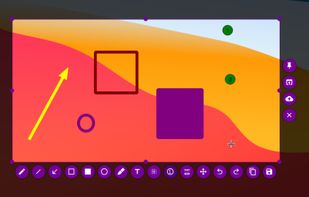
Flameshot is a free, open-source screenshot tool that is cross-platform compatible, offering customization, editing features, CLI scripting, and direct Imgur uploads for seamless sharing. It provides an intuitive user experience through features like area selection, annotations, and saving options.

Cost / License
- Free
- Open Source (GPL-3.0)
Application type
Platforms
- Mac
- Windows
- Linux
- Flathub
- Snapcraft


Features
Flameshot News & Activities
Highlights All activities
Recent News
- Danilo_Venom published news article about Flameshot
 Flameshot version 13.0.0 launches with Qt6 port and enhanced Wayland support
The Flameshot team has officially launched version 13.0.0, the first release of the screenshot util...

Recent activities
 c17s5qhu added Flameshot as alternative to Zipline Android
- tooaverage added Flameshot as alternative to Foldout Screenshot
- le_ann992 liked Flameshot
- shimon_barav added Flameshot as alternative to Screen Slinger


Featured in Lists

This guide is designed for anyone looking to take greater control of their digital life by choosing open-source...
List by EUFOSS9132 with 126 apps, updated
Clean, small, use! For activation use: [https://massgrave.dev/](https://massgrave.dev/) or...
List by littlebighorse with 53 apps, updated

Choose freedom and continued democracy by switching away from big tech in your personal digital lives. Not all apps...
List by ddnn with 81 apps, updated
What is Flameshot?
Flameshot information
Developed by
Flameshot contributorsLicensing
Open Source (GPL-3.0) and Free product.Written in
Rating
Average rating of 4.4Alternatives
107 alternatives listedBadge
Get an embeddable badge for FlameshotSupported Languages

AlternativeTo Categories
Photos & Graphics, Development, Office & ProductivityGitHub repository
- 30,855 Stars
- 2,017 Forks
- 721 Open Issues
- Updated


Comments and Reviews
Great alternative to ShareX, works flawlessly. Easy to install and use, even when compiling it myself.
No new release since on Jul 3, 2022 Better alternative Gradia
They just released version 13.
Flameshot's unique pin area option is a way to do regional page paste editing on-the-fly. For sorting/pasting Flameshot is the best option. Minor drawback.. it only works from tray or hotkeys. The tray popup can get in the way of the capture. It can mark up with text, lines etc before capture, but there's also a lesser-known program, Toolwiz Care icon Toolwiz Care with a toolbar and markup ability where tray popup doesn't get in way, so it's a matter of choosing the right tool for the task.
I use screenshot tools on Windows, more rarely on Linux distros. I am not satisfied with Flameshot, I try it once every few years, but every time I gave up on it because:
• It is designed as a way to replace the screenshot key, which can be useful in other cases (I like the ability to take instant screenshot without delay). Probably that spending some time with autohotkey or Powertoys I could set up another key to do that, but this is not the only limitation.
• Similarly, it is not really possible to use it in any way to edit a picture already captured in another way. There is an issue about this limitation dating back to 2018 and the latest version as of 2026-03-03 doesn't have a solution for it. 8 years without a solution… It's not great. I write down this comment so I can find it when I try to find a better screenshot solution in 2 years.
• The latest version on (windows) chocolatey is 12.1.0 (Jul 2022) while the latest available today (3rd of March, 2026) is 13.3.0 (Oct 2025)
Okay, wow. Should be the default on all operating systems. Intuitive, lots of features, easily configurable. And exportable settings!
Easy markups/saves an on captures. No signup/sign in. Flameshot's unique pin area option is a way to do regional page paste editing on-the-fly. For sorting/pasting Flameshot is the best option. Minor drawback.. it only works from tray or hotkeys. The tray popup can get in the way of the capture. It can mark up with text, lines etc before capture, but there's also a lesser-known program, Toolwiz Care with a toolbar and markup ability where tray popup doesn't get in way, so it's a matter of choosing the right tool for the task.
Flameshot is fine in most respects, but it does not allow shortcuts to be assigned, which is a crucial feature for me, as I want to switch instantly between a regional shot and a window shot, using keys of my choice. Maybe in a later version...
Shortcuts can be assigned, but not to some key features that are likely wanted.