C
C

Clarus

Screenshot and screen recording tool for Windows designed for fullscreen, area, or window captures, with audio recording, advanced annotation editor, and text-based search. Pro features add scrolling capture, text extraction, webcam, replays, and cloud sharing.
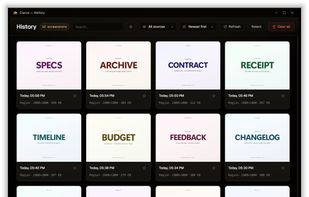
Capture history — every screenshot and recording in one place, each one indexed by the text inside it.

Cost / License

  • Freemium (Pay once or Subscription)
  • Proprietary

Application type

Platforms

  • Windows  Windows 10 64-bit version 2004 (build 19041) or newer, or Windows 11 64-bit. Clarus takes over the Win+Shift+S shortcut from the Snipping Tool while it is installed; uninstalling hands it back.
0likes
0articles

Features

Properties

  1.  Privacy focused
  2.  AI-Powered

Features

  1.  Non Destructive Editing
  2.  No Tracking
  3.  Annotate Screenshot
  4.  Built-in Color Picker
  5.  Works Offline
  6.  Ad-free
  7.  Dark Mode
  8.  Upload Screenshot
  9.  Hardware Accelerated
  10.  Full-page Screenshot
  11.  Support for 4K
  12.  No registration required
  13.  Screen Recording
  14.  Webcam recording
  15.  Edit screenshots
  16.  Video annotation
  17.  Auto Scrolling
  18.  Share screenshots
  19.  Audio Recording
  20.  Image Annotations
  21.  Share Videos
  22.  Screenshot OCR
  23.  Capture Video
  24.  Record videos

Clarus News & Activities

Highlights All activities

Recent activities

Clarus information

  • Developed by

    AE flagClarus LLC
  • Licensing

    Proprietary and Freemium product.
  • Pricing

    One time purchase that costs $99, and / or subscription ranging between $3 and $6 per month + free version with limited functionality.
  • Alternatives

    29 alternatives listed
  • Badge

    Get an embeddable badge for Clarus
  • Supported Languages

    • English
Clarus was added to AlternativeTo by Clarus on and this page was last updated .
No comments or reviews, maybe you want to be first?

What is Clarus?

Clarus is a screenshot and screen-recording tool for Windows. It takes fullscreen, area and window captures, records your screen with audio on a real video timeline, and gives you a full annotation editor for both. Every capture is indexed by the text inside it, so you can find a screenshot months later by typing a word you remember seeing in it.

The free version needs no account and has no time limit. Pro adds scrolling capture, text extraction, webcam in recordings, instant replay and cloud sharing.
