Apps tagged with 'On Screen Annotation'

All apps in Apps tagged with 'On Screen Annotation' category. Use the filters below to narrow down your search. 
Copy a direct link to this comment to your clipboard
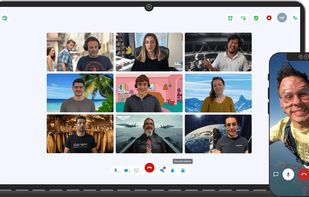
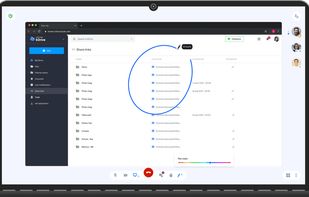
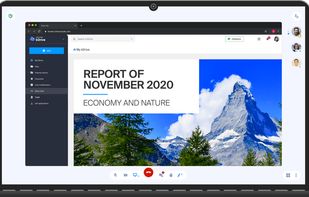
  1. Privacy-focused video meetings with unlimited participants, secure AES-256 encryption, no data sale or registration, hosted in Switzerland and powered by renewable energy.

    Cost / License

    Application type

    Platforms

    • Mac
    • Windows
    • Linux
    • Online
    • Android
    • iPhone
    • Chrome OS
    • Android Tablet
    • iPad
    • F-Droid
    • CH flagSwitzerland
    Infomaniak kMeet screenshot 1
    Infomaniak kMeet screenshot 1
    Infomaniak kMeet screenshot 2
    +14
    Infomaniak kMeet screenshot 3
    94 alternatives
  2. EpicPencil icon
     4 likes

    Draw, highlight, erase, and add text over any desktop app with a multi-monitor canvas, customizable hotkeys, and no accounts or telemetry.

    Cost / License

    • Free
    • Proprietary

    Application type

    Platforms

    • Mac
    • Windows
    • Linux
    • ES flagSpain
    • European Union flagEU
    EpicPencil
    EpicPencil screenshot 1
    14 alternatives
  3. Screenbits icon
     11 likes

    Fast, flexible, and easy-to-use screen recorder for gameplay, tutorials, product demos, and more. Record your screen, system audio, microphone, and camera in high-quality HD or 4K with smooth performance.

    Cost / License

    • Freemium
    • Proprietary

    Application type

    Platforms

    • Windows
    • Steam
    Screenbits screenshot 1
    Screenbits screenshot 1
    Screenbits screenshot 2
    +11
    Screenbits screenshot 3
    129 alternatives
  4. Highlights the mouse pointer with a ring, animates clicks, dims background for focus, allows screen drawing, and is ideal for teaching, demos, or tutorials.

    Cost / License

    • Freemium
    • Proprietary

    Application type

    Platforms

    • Mac
    • CN flagChina
    FocusCursor screenshot 1
    FocusCursor screenshot 1
    FocusCursor screenshot 2
    +1
    FocusCursor screenshot 3
    28 alternatives
  5. Pointofix icon
     2 likes

    Every screen content can be made available as a digital drawing area so that you can mark and highlight important things. Thus Pointofix is ideal for you as a teacher or IT trainer to support your lectures, training courses and presentations.

    Cost / License

    • Free
    • Proprietary

    Platforms

    • Windows
    • DE flagGermany
    • European Union flagEU
    Pointofix screenshot 1
    21 alternatives
  6. Presentify icon
     2 likes

    A macOS menu bar app that helps you give better presentations, online classes, or video tutorials by letting you annotate any screen, highlight your cursor, and more.

    Cost / License

    • Paid
    • Proprietary

    Application type

    Platforms

    • Mac
    • IE flagIreland
    • European Union flagEU
    Presentify screenshot 1
    Presentify screenshot 1
    Presentify screenshot 2
    +2
    Presentify screenshot 3
  7. iMyFone MirrorTo is a screen mirroring app that comes up with the following features. 1) Cast your Android device screen to the Windows computer. 2) Control Android devices using your computer's keyboard and mouse. 3) 1080P HD screen recording.

    Cost / License

    • Paid
    • Proprietary

    Application type

    Platforms

    • Windows
    • Mac
    • Android
    • iPhone
    • CN flagChina
    launch MirrorTo
    connect your Android device
    mirror your phone to PC
    35 alternatives
  8. FlowInk icon
     1 like

    FlowInk is a lightweight, free screen annotation (overlay drawing) tool designed specifically for Windows. It lets you draw, write, or scribble directly on top of any open application, desktop, or screen in real time.

    Cost / License

    • Free
    • Open Source

    Application type

    Platforms

    • Windows
    • JP flagJapan
    Explaining a screen during a presentation
    Chart analysis
    Rectangle and text menus
    +1
    Tool bar
    32 alternatives
  9. Markwright icon
     1 like

    Markwright is a powerful yet lightweight (under 2 Mb .exe, around 6 Mb RAM) screen annotation tool for technical presenters and content creators, that’s modern, has zero dependencies, does not require registration, has no tracking or telemetry, works completely offline, and...

    Cost / License

    • Free
    • Proprietary

    Application type

    Platforms

    • Windows
    • GB flagUnited Kingdom
    Markwright screenshot 1
    9 alternatives
  10. ScreenSage is a macOS screen recording and tutorial creation tool designed for high-quality video capture. It allows users to record their screen with smooth performance, add annotations, and edit directly within the app.

    Cost / License

    • Freemium
    • Proprietary

    Application type

    Platforms

    • Mac
    • CN flagChina
    ScreenSage Pro screenshot 1
    ScreenSage Pro screenshot 1
    ScreenSage Pro screenshot 2
    +1
    ScreenSage Pro screenshot 3
    25 alternatives
  11. Gromit-MPX icon
     12 likes

    Gromit-MPX is an on-screen annotation tool that works with any Unix desktop environment under X11 as well as Wayland.

    Cost / License

    • Free
    • Open Source

    Platforms

    • Linux
    • Ubuntu
    • DE flagGermany
    • European Union flagEU
    Gromit-MPX screenshot 1
    Gromit-MPX screenshot 1
    Gromit-MPX screenshot 2
    19 alternatives
  12. Distinct from Genius's original rap and music lyric annotations, Genius.it Web Annotator lets you add line-by-line annotations to any page on the Internet.

    Cost / License

    • Free
    • Proprietary

    Platforms

    • Online
    • Wordpress
    • US flagUnited States
    Genius.it Web Annotator screenshot 1
    Genius.it Web Annotator screenshot 1
    8 alternatives
  13. ScreenMark icon
     1 like

    Menu bar presentation overlay for macOS — draw, zoom, highlight and record on any screen, and control it all from your iPhone.

    Cost / License

    • Freemium
    • Proprietary

    Platforms

    • Mac
    • TR flagTürkiye
    The menu bar panel: zoom, draw, snip, freeze, snapshot, recording, cursor tools and board surfaces in one place.
    Zoom style options — full screen, follow lens or cursor focus — alongside the break timer controls.
    Live zoom magnifying part of the screen while the underlying app keeps running normally. Follow-lens zoom tracking the cursor over a menu, so the audience sees exactly what is being clicked.
    +7
    Arrows, boxes, highlighter and in-place text drawn straight over a live web page.
    9 alternatives
  14. Crop and share specific screen areas, use dynamic spotlight and cursor halo to focus attention, draw annotations live, and switch to a whiteboard canvas for ideas in any meeting app.

    Cost / License

    • Freemium
    • Proprietary

    Platforms

    • Mac
    Screenbites screenshot 1
    2 alternatives
  15. DemoPro icon
     2 likes

    DemoPro is a simple and unobtrusive screen annotation tool for the Mac ideal for live demonstrations. Just press a customizable hotkey to draw on the screen. Release it to continue your demonstration. DemoPro also includes a countdown timer.

    Cost / License

    • Paid
    • Proprietary

    Platforms

    • Mac
    DemoPro screenshot 1
    DemoPro screenshot 1
    DemoPro screenshot 2
    +1
    DemoPro screenshot 3
    20 alternatives
  16.  Like

    Screenshot and screen recording tool for Windows offering area, window, and fullscreen capture, searchable text indexing, annotation editor, and audio recording.

    Cost / License

    • Freemium
    • Proprietary

    Application type

    Platforms

    • Windows
    • AE flagUnited Arab Emirates
    Capture history — every screenshot and recording in one place, each one indexed by the text inside it.
    Searching "invoice" finds it inside the images. Two of these three don't show the word in the thumbnail at all.
    The video editor — trim, split and annotate a recording on a real timeline.
    29 alternatives
  17. Draw Over It gives presenters, trainers, and any professional an always-ready overlay for live markups. Open it with a hotkey, sketch directly on top of any app, and jump back to work without leaving a trace.

    Cost / License

    • Paid
    • Proprietary

    Platforms

    • Mac
    • PL flagPoland
    • European Union flagEU
    Draw Over It screenshot 1
    Draw Over It screenshot 1
    Draw Over It screenshot 2
    +3
    Draw Over It screenshot 3
    15 alternatives
  18. bananotate is a powerful application that allows you to edit and annotate your screen live. Zoom in, highlight, draw shapes, add text, capture your screen, create mock UI, and much more.

    Cost / License

    • Freemium
    • Proprietary

    Application type

    Platforms

    • Mac