
migaVka icon
migaVka icon

migaVka

Fast, private screenshot and screen recording tool for Windows 11 — capture, annotate, record MP4/GIF and OCR, all fully offline.
migaVka screenshot 1

Cost / License

  • Pay once
  • Proprietary

Application type

Platforms

  • Windows
1like
0articles

Features

Properties

  1.  Privacy focused

Features

  1.  Annotate Screenshot
  2.  No registration required
  3.  Works Offline
  4.  Ad-free
  5.  Dark Mode
  6.  No Tracking
  7.  Screen Recording
  8.  Screenshot OCR

migaVka News & Activities

Highlights All activities

Recent activities

migaVka information

  • Developed by

    groker
  • Licensing

    Proprietary and Commercial product.
  • Pricing

    One time purchase (perpetual license) ranging between $2 and $5.
  • Alternatives

    7 alternatives listed
  • Badge

    Get an embeddable badge for migaVka
  • Supported Languages

    • English

AlternativeTo Categories

Video & MoviesPhotos & Graphics
migaVka was added to AlternativeTo by groker on and this page was last updated .
No comments or reviews, maybe you want to be first?

Official Links

What is migaVka?

migaVka is a lightweight screenshot and screen-recording tool for Windows 11. One press of Print Screen dims the screen; region selection snaps to windows and UI elements, with a pixel loupe for precision.

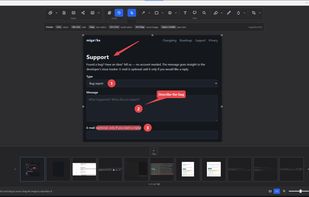
The editor offers arrows, shapes, callouts, numbered steps, text, highlighter, blur/pixelation, magnifier and crop — everything remains editable and undoable afterwards. Every capture auto-saves with its edit history and can be reopened, versioned and exported to PNG.

Ctrl+Print Screen records MP4 with system/microphone audio and GIF export. Includes OCR, pin-on-top reference windows, an edge-docked quick launcher, dark/light themes and 15 languages. Paid (one-time), 7-day free trial.

Private by design: no account, no cloud, no telemetry.