




MacMetra
Like
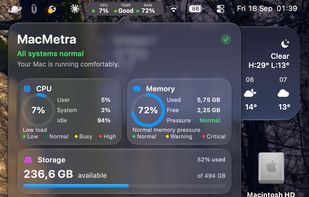
A macOS system monitor that lives entirely in the menu bar, showing CPU load, thermal state and memory at a glance, with a one-click dashboard.

Cost / License
- Pay once
- Proprietary
 EU
EUPlatforms
- Mac


Features
MacMetra News & Activities
Highlights All activities
Recent activities
- DanielDinu added MacMetra
 DanielDinu added MacMetra as alternative to iStat Menus, Stats, iStatistica and MenuBar Stats

MacMetra information
Developed by
 Daniel Dinu
 Licensing
Proprietary and Commercial product.Pricing
One time purchase (perpetual license) that costs $3.Alternatives
6 alternatives listedBadge
Get an embeddable badge for MacMetraSupported Languages


No comments or reviews, maybe you want to be first?
