




massCode
19 likes
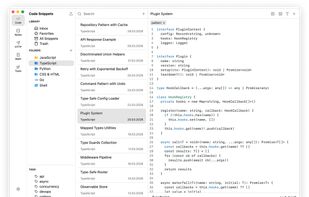
Free, open-source developer workspace for code snippets, Markdown notes, HTTP requests, calculations, drawings, and developer tools.

Cost / License
- Free
- Open Source (AGPL-3.0)
Application type
Platforms
- Mac
- Windows
- Electron
- Ubuntu
- Linux


Features
massCode News & Activities
Highlights All activities
Recent News
No news, maybe you know any news worth sharing?
Share a News TipRecent activities
- saffian updated massCode
 ktg0215 added massCode as alternative to SnippetVault
- cmcrossno liked massCode
 bioszen added massCode as alternative to Smart Code Library
 POX added massCode as alternative to Code Snippet Holder
 mharon3015 added massCode as alternative to GistPad.com
- eluzja liked massCode


massCode information
Developed by
 Anton Reshetov
 Licensing
Open Source (AGPL-3.0) and Free product.Written in
Alternatives
37 alternatives listedBadge
Get an embeddable badge for massCodeSupported Languages

AlternativeTo Categories
Development, Office & Productivity, OS & UtilitiesGitHub repository
- 6,994 Stars
- 267 Forks
- 5 Open Issues
- Updated


Featured in Lists

These are all the software I use on my windows machine. I am privacy freak. So, I mostly use open source software....
List by sam with 100 apps, updated

A list with 17 apps by samgu without a description.
List by Guillaume Sammut with 17 apps, updated
Comments and Reviews
uses the same code editor of vscode (monaco editor), so it is perfect as a note taker for programmers
Loved the integrated code formatter (it's using Prettify). A snippet can have multiple languages (called "fragments"). Support for tags. Uncluttered interface.