


MiniLyrics
75 likes
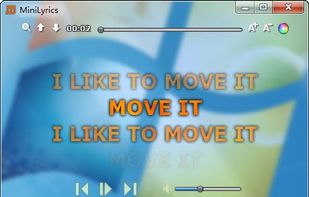
MiniLyrics is a software that displays scrolling lyrics for selected tracks. It works with various media players like iTunes, Windows Media Player, Winamp, Spotify, Album Player, Helium Music Manager, JetAudio, VLC Media Player and XMPlay.

Platforms
- Mac
- Windows
- Android


Discontinued
The program is no longer updated. Last version, released in February 2015, can be still downloaded from the official website, but it's reportedly not working because it takes lyrics from the website viewlyrics.com which is discontinued and contains lots of broken links

Features
MiniLyrics News & Activities
Highlights All activities
Recent News
No news, maybe you know any news worth sharing?
Share a News TipRecent activities
No activities found.
Featured in Lists

This should be fun & interesting!
List by Willie Maughan with 85 apps, updated

Basic Running Applications
List by Chask with 13 apps, updated

With some exceptions and tools.
List by stardust_will with 18 apps, updated
What is MiniLyrics?
MiniLyrics information
Developed by
 Crintsoft
 Licensing
Proprietary and Free product.Rating
Average rating of 3.4Alternatives
14 alternatives listedBadge
Get an embeddable badge for MiniLyricsSupported Languages


Comments and Reviews
Minilyrics its great for music, now its online again.
Works great!! And its not discontinued.
Their web works perfectly as its used to.
The software work of course, but www.viewlyrics.com - to download&upload lyrics won't work anymore :'( The plugin may not work on some recent players.
The application will open on El Capitan, but it does not display lyrics for VLC, and crashes whenever I try to play a song from iTunes. Who knows if it will work with other media players, but I don't use other media players, so, that's it for me.
Good stuff... IF they get it working again
When you hear a new tune on your favorite player, whether it is WMP, VLC, iTunes, or Winamp, it automatically searches the MiniLyrics community for the right lyrics and usually succeeds on its first try. If not, you can search the online database to find the right lyrics, or you can just edit them yourself. No matter how the lyrics are found, they're saved to your drive so you don't need to re-search for them.
Unfortunately, the online database is down due to the site, crintsoft.com, being unavailable since mid February 2018. This means the only way to add lyrics is to search them out yourself (try searching with lyrics.wikia.com first) and adding them to the editor. Quite time consuming, especially if you like the karaoke style lyric scrolling.
Right now, I'd suggest looking for another lyric plugin until the site and community come back. Don't go holding your breath, though.
Free users has cooldown timer while using the apps
Until very recently, MiniLyrics worked fine. Now though, every time I start WinAmp, it goes through the initial plugin set-up to install the plugins for the players.
I cannot understand what is wrong, but no amount of uninstalling/re-installing WinAmp and MiniLyrics works. I've even uninstalled Windows Media Player, and set permissions to WinAmp directory to full allow for everyone, just in case there was something wrong there.
The curious thing, is if I just close (or for that matter re-install) the MiniLyric WinAmp plugin on the screen it gives, Opening WinAmp a 2nd time does not produce this error. And the program works as expected.
It works perfectly till new update in vlc, now there is not a way to show if the pluguin is installed, and it don't show the lyrics for that reason,also don't work in MPC-HC 64, only in 32bits.
[Edited by marcelg, April 19]