MixDesk X icon
MixDesk X icon

MixDesk X

Multi-device audio mixing software for Mac and Windows captures system or application sound, routes up to 16 stereo outputs with per-channel EQ, real-time analyzer, Auto-EQ, CLAP plugin support, per-bus delay, safety limiter, and recallable routing presets.
MixDesk X screenshot 1

Cost / License

  • Free
  • Proprietary

Application type

Platforms

  • Mac
  • Windows
10likes
0articles

Features

Properties

  1.  Lightweight
  2.  Privacy focused

Features

  1.  No Tracking
  2.  Works Offline
  3.  No registration required
  4.  Dark Mode
  5.  Ad-free
  6.  Extensible by Plugins/Extensions
  7.  Live Streaming
  8.  Audio Router
  9.  Built-in Equalizer
  10.  Virtual Audio Device
  11.  Sound Effects
  12.  Mix Music

MixDesk X News & Activities

Highlights All activities

Recent activities

MixDesk X information

Our users have written 1 comments and reviews about MixDesk X, and it has gotten 10 likes

MixDesk X was added to AlternativeTo by Mathias Schneider on and this page was last updated .

Comments and Reviews

   
ahmed-javed6667
0

Overall, it’s an excellent choice for users who want more control than a basic audio mixer provides, although beginners may need some time to learn its routing system.

Official Links

What is MixDesk X?

MixDesk X turns a Mac or Windows PC into a software mixing console — and a full system processor.

It captures system audio or individual apps with no virtual cable needed, and routes audio to up to 16 stereo output buses, each on its own device.

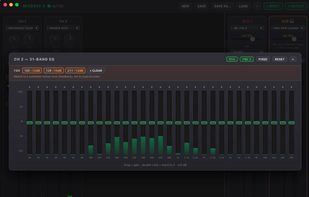
On the output side it is a software DriveRack: an active crossover with automatic delay alignment, a live real-time analyzer with one-click pink-noise 31-band Auto-EQ, a feedback destroyer, and a low-cut/rumble filter — plus per-bus delay, a safety limiter, and PFL/cue with a dedicated headphone output. Every input and bus also has its own EQ and hosts CLAP plugins (~400 free effects available).

Because the delay alignment measures and compensates real latency, you can drive a fully active (bi-/tri-amped) rig straight from the laptop with any multi-out interface — even mixing different devices, no matched low-latency rack required. Presets store the complete routing setup.

For pros who want a full patchbay inside the machine, an optional free multi-channel loopback driver (based on BlackHole) is available for macOS; on Windows, pair it with VB-Cable. 32-bit float / 48 kHz signal path. No account, no tracking, works offline.

