




Monitorian
18 likes
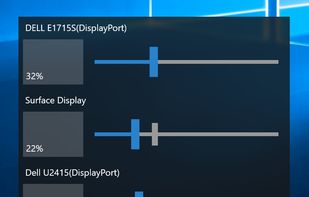
Monitorian is a Windows desktop tool to adjust the brightness of multiple monitors with ease.

Cost / License
- Free
- Open Source (MIT)
Application type
Platforms
- Windows

Features
Monitorian News & Activities
Highlights All activities
Recent News
No news, maybe you know any news worth sharing?
Share a News TipRecent activities
 Ryder-Selikow added Monitorian as alternative to Candela
 Ud3g added Monitorian as alternative to darkbright-helper
Perfect little app for the brightness adjustment.
- Netkuszkusz replied to a comment / review on Monitorian
- Netkuszkusz liked Monitorian
 Mahoni added Monitorian as alternative to TSS EcoScreen
 THEODOREHQ added Monitorian as alternative to Solace
 POX added Monitorian as alternative to JoyScreen
- K0RR added Monitorian as alternative to winddcutil
- K0RR added Monitorian as alternative to monitorcontrol (Python)


Featured in Lists

My setup for a mix of development work and general use.
List by itsnate with 47 apps, updated

What is Monitorian?
Monitorian information
Developed by
 Emoacht
 Licensing
Open Source (MIT) and Free product.Written in
Rating
Average rating of 3.8Alternatives
28 alternatives listedBadge
Get an embeddable badge for MonitorianSupported Languages

AlternativeTo Category
System & HardwareGitHub repository
- 4,714 Stars
- 221 Forks
- 14 Open Issues
- Updated


Comments and Reviews
Perfect little app for the brightness adjustment.
Subscription for hotkeys is crazy. Twinkle is just better in every way and free
Not really true, though. Twinkle Tray can be slow and glitchy. I switched to Monitorian, which is much faster, and brightness adjustments are instant.
Quite easy to use and lightweight. Restricting brightness ranges means more precision in synchronizing different monitors.
It displayed a small black rectangle box with the name Monitorian, nothing more.
Light and easy to use. There is currently no timing adjustment.
Can adjust Display Monitor Hardware Brightness even when OSD buttons are broken or not available
Subscription pricing for the ability to map hotkeys? One off fee sure, but subscription? Decent program ruined by over-the-top greed.