MS Paint IDE icon
MS Paint IDE icon

MS Paint IDE

People joke about what IDE they use often, things like Word, MS Notepad, sometimes even Eclipse, and then often times MS Paint. People joke about MS Paint because it's not even a text editor, people joke about it because it doesn't have one feature in common with IDEs.
MS Paint IDE screenshot 1

Cost / License

  • Free
  • Open Source (MIT)

Application type

Platforms

  • Windows
  • Microsoft Paint
2likes
0articles

Features

  1.  OCR

MS Paint IDE News & Activities

Highlights All activities

Recent activities

No activities found.

MS Paint IDE information

AlternativeTo Categories

Office & ProductivityDevelopment

GitHub repository

  •  1,433 Stars
  •  42 Forks
  •  7 Open Issues
  •   Updated  
View on GitHub

Popular alternatives

View all

Our users have written 2 comments and reviews about MS Paint IDE, and it has gotten 2 likes

MS Paint IDE was added to AlternativeTo by Paul on and this page was last updated .

Comments and Reviews

   
Top Positive Comment
TitaniumSpork
0

My cs teacher wants screenshots of our programs running with the date and time visible. Often, Visual studio is visible in frame. Just wait till he sees this

Guest
0

I would describe it ass my dream appk :)

Review from a new or low-activity account — shown here, but not counted in the app rating.

Official Links

What is MS Paint IDE?

People joke about what IDE they use often, things like Word, MS Notepad, sometimes even Eclipse, and then often times MS Paint. People joke about MS Paint because it's not even a text editor, people joke about it because it doesn't have one feature in common with IDEs. Well, this application gives MS Paint a boost, and lets MS Paint highlight, compile, and execute code, with just a few clicks of a button, and only text coming from MS Paint. It is now much more practical than things like Word, Notepad, and obviously Eclipse.

How it works

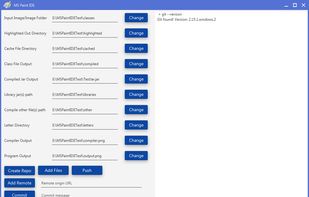
The way the MS Paint IDE works, is it is an application running separate from MS Paint. You input some locations for things like input image, output image location, compile to folder, etc. Once you save your code to MS Paint, you click Compile/Execute and the program uses a custom OCR implementation designed specially for MS Paint and code, then syntax highlights it, and then uses Java's JDK to compile the code and execute it. All output from the compiler and application compiled are outputed via images.

MS Paint IDE Videos