
MultiDrive icon
MultiDrive icon

MultiDrive

Multidrive is a free, easy-to-use disk management software with a powerful command line interface. Perfect for system administrators and advanced users. Works in Windows 10 and 11.
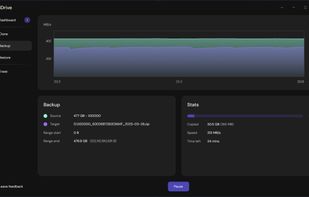
MultiDrive screenshot 1

Cost / License

  • Free
  • Proprietary

Application type

Platforms

  • Windows
6likes
0articles

Features

Properties

  1.  Lightweight

Features

  1.  Portable
  2.  Works Offline
  3.  Dark Mode
  4.  Command line interface
  5.  Ad-free
  6.  Disk Cloning
  7.  Disk Imaging
  8.  File Shredder

MultiDrive News & Activities

Highlights All activities

Recent activities

MultiDrive information

MultiDrive was added to AlternativeTo by RazTK on and this page was last updated .
No comments or reviews, maybe you want to be first?

What is MultiDrive?

Multidrive is a free, easy-to-use disk management software with a powerful command line interface. Perfect for system administrators and advanced users. Works in Windows 10 and 11.

Clone Create exact replicas of your drives. Ideal for upgrading to a better drive or creating bootable backups.

Erase Permanently wipe a full drive or its parts with a secure wiping method. Specify Hex pattern when needed.

Backup Create backup of your entire drive or a selected range in RAW, ZIP, or ZSTD format. ZSTD backups use Zstandard compression and are saved as .zst files.Ensure data integrity using hash.

Restore Restore a full drive or selected ranges from RAW, ZIP, or ZSTD (.zst) backup files. Split files are supported.

WinPE Run MultiDrive in Windows Preinstallation Environment (WinPE) to clone, back up, restore, or erase drives without booting into the installed Windows system. Ideal for working with system drives.

Command Line Interface Automate disk operations with a powerful CLI. Perfect for system administrators and tech enthusiasts.

Parallel Operations Run multiple disk operations simultaneously to save time. Monitor progress from a single dashboard.

Pause and Resume Pause active disk operations and resume them later. Interrupted tasks, including those stopped by connection issues or other unexpected events, can also be resumed without starting over.

MultiDrive Videos
