MyShell is a native cross-platform desktop shell workspace for macOS, Windows, and Linux designed to bridge the gap between traditional terminal emulators and modern AI-assisted developer workflows.
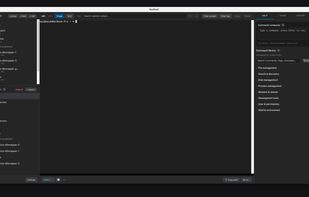
Unlike typical terminal windows that stop at a prompt, MyShell features a dual-pane layout with terminals on the left and center, and an intelligent utility panel on the right. It auto-detects your environment (local or remote SSH across macOS, Windows, and various Linux distros) as well as active tool contexts (vim, python, psql, mysql), automatically tailoring commands, tasks, and documentation to your active session.
Key Capabilities:
Context-Aware Offline Help Library: Search and reference command syntax, flags, and recipes fully offline without breaking focus or needing an internet connection.
Smart Command Composer: Type commands with smart autocomplete powered by your session history and built-in help library, then send them directly to the active prompt in one click.
In-Session AI Assistant (BYOK Supported): Describe complex bash scripts, SQL queries, or deployment tasks in plain language. The AI generates commands complete with interactive "Run" buttons that execute straight in your active session. Supports Bring-Your-Own-Key (OpenAI, etc.) for zero monthly subscriptions.
Quick Starts & Session Persistence: Save daily local directories and SSH connections with custom working directories, startup scripts, and keep-alive background capabilities. Relaunching the app restores your side-panel sessions and scrollback history.
Privacy & Native Performance: Built as a lightweight, low-footprint desktop app using native system OpenSSH and local storage by default. End-to-end encrypted cloud sync is available as an optional add-on.







 jetcodes


No comments or reviews, maybe you want to be first?