


namebench
44 likes
Are you a power-user with 5 minutes to spare? Do you want a faster internet experience?

Platforms
- Mac
- Windows
- Linux


Discontinued
no commits on github since 2018 and no response in the issues section.

Features
namebench News & Activities
Highlights All activities
Recent activities

Featured in Lists

I use these software on my Windows 10 Systems
List by Richard Rothacker with 31 apps, updated

A list with 14 apps by amritkarmacharya without a description.
List by amritkarmacharya with 14 apps, updated
What is namebench?
namebench information
Developed by
 Thomas Stromberg
 Licensing
Open Source (Apache-2.0) and Free product.Written in
Alternatives
5 alternatives listedBadge
Get an embeddable badge for namebenchSupported Languages

AlternativeTo Category
OS & UtilitiesGitHub repository
- 932 Stars
- 154 Forks
- 14 Open Issues
- Updated (Archived)


Comments and Reviews
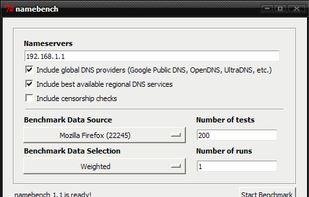
Most people are likely only looking for fastest DNS, and DNSJumper is likely better program. Namebench does exhaustive/time-consuming list of DNS servers (I haven't found a way to narrow down) then gives a summary-form analysis vs a readout like DNSJumper. However, Namebench gives analysis comments about security, about hacked and/or broken connections, and I think that's a valid issue. Nambench requires Go 1.2 to be installed.. ok. The DNS most recommended was pay-for(not noted). Numerous recommendations given. Test results are saved in http form (open w/browser) On the surface, default settings of other program, DNSJumper, make DNSJumper look simplistic, but if you press Default DNS from multi-folder icon, big list appear. Lightning Bolt icon starts speed test, . .and DNS Jumper program makes it easy to switch DNS. To check the DNS is working, one method .. go to www.top10vpn.com/tools/what-is-my-dns-server/
While not updated since 2010, it's not entirely abandoned. The website was updated with InSpectre (for Meltdown and Spectre analysis) in Mar 07, 2018. Previous prior to that addition was in 2016. I guess the developer didn't abandon it, there was just nothing to fix all this time.
I'm not sure why it kept recommending me to use 127.0.0.1 as a DNS server. I ended up using DNS Benchmark instead, which was more intuitive for me.