N
N

notePad++++

A native macOS text editor with syntax highlighting for 50+ languages, Markdown WYSIWYG, JSON/YAML support, regex and Column Mode, custom scripts, batch processing, and optional AI assistance.
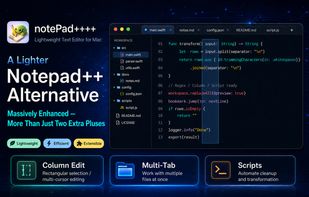
Main editor workspace with tabs, syntax highlighting, and local-file editing.

Cost / License

  • Freemium
  • Proprietary

Application type

Platforms

  • Mac  Requires macOS 12 or later.
2likes
0articles

Features

Properties

  1.  Lightweight

Features

  1.  WYSIWYG Support
  2.  WYSIWYG HTML Editor
  3.  Live Preview
  4.  Full-Text Search
  5.  Dark Mode
  6.  No registration required
  7.  Syntax Highlighting
  8.  Support for MarkDown
  9.  Works Offline

notePad++++ News & Activities

Highlights All activities

Recent activities

notePad++++ information

AlternativeTo Categories

DevelopmentOffice & Productivity
notePad++++ was added to AlternativeTo by stevexu on and this page was last updated .
No comments or reviews, maybe you want to be first?

Featured in Lists
A list with 35 apps by namdx1987 without a description.

List by Nam Pham with 35 apps, updated

Official Links

What is notePad++++?

NotePad++++ is a lightweight native macOS text editor and text-processing workbench with over 100,000 downloads and an average rating above 4.8. It was designed for practical Notepad++-style workflows on Mac. The application allows users to edit local text and code files in tabs, providing syntax highlighting for more than 50 programming, markup, and data languages.

The editor includes features such as regular-expression search and replace, workspace-wide search, Column Mode, and support for common structured formats including Markdown, JSON, and YAML. Its Markdown editing includes a WYSIWYG-style writing and live preview workflow, enabling users to work with formatted content without leaving the editor.

NotePad++++ also offers built-in text pipelines, custom JavaScript scripts, and batch processing tools for repetitive work. Users can clean, transform, extract, sort, deduplicate, or normalize text across files, preview changes in a diff before applying them, and review or roll back broad edits when needed.

The application includes an optional AI assistance feature which can generate or improve scripts and assist with text-processing tasks. Users must provide their own API key and choose the AI provider. The app only uses AI when the user explicitly invokes the feature.

Core editing and local-file workflows operate without an account and can be used offline. NotePad++++ is an independent macOS app and is not affiliated with the Notepad++ project.