OpenGPEX icon
OpenGPEX icon

OpenGPEX

OpenGPEX is a next-generation browser-based image editor built for professionals who care about privacy and performance.
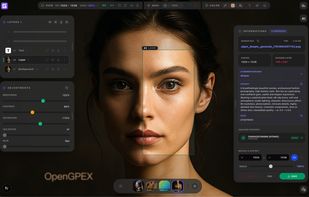
OpenGPEX editor workspace with a multi-layer composition featuring AI-generated content. Left panel shows layer stack and real-time adjustments (Brightness, Contrast, Saturation, etc.). Right panel displays AI generation metadata, prompt, seed, and export options. Bottom dock enables quick multi-document navigation. Runs entirely in the browser — no install, no upload.

Cost / License

Application type

Platforms

  • Online
  • Self-Hosted
0likes
0articles

Features

Properties

  1.  Privacy focused
  2.  AI-Powered

Features

  1.  Dark Mode
  2.  WYSIWYG Support
  3.  Live Preview
  4.  Built-in Color Picker
  5.  Hardware Accelerated
  6.  Custom Brushes
  7.  Cloud Sync
  8.  Extensible by Plugins/Extensions
  9.  No Tracking
  10.  Support for Layers
  11.  No registration required
  12.  Non Destructive Editing
  13.  Browser-based

OpenGPEX News & Activities

Highlights All activities

Recent activities

OpenGPEX information

AlternativeTo Categories

Photos & GraphicsSystem & Hardware

GitHub repository

  •  0 Stars
  •  0 Forks
  •  0 Open Issues
  •   Updated  
View on GitHub
OpenGPEX was added to AlternativeTo by only1onely on and this page was last updated .
No comments or reviews, maybe you want to be first?

Official Links

What is OpenGPEX?

OpenGPEX is a next-generation browser-based image editor built for professionals who care about privacy and performance.

Core features: • AI tools running entirely client-side (WebGPU/WASM) — background removal, 4x upscaling, semantic segmentation (SAM 2.1), and AI inpainting. Your images never leave your browser. • Display P3 wide gamut + linear-light compositing for physically correct color blending • RAW format support (CR2, NEF, ARW, DNG...) + 1TIFF export • TIFF format support • 60fps smooth UI with zero main-thread pixel computation • ComfyUI Bridge — connect to your ComfyUI service and run any AI workflow • Professional adjustment tools: Curves, Levels, Channel Mixer, Color Balance, Channel View • Layer system with 16+ blend modes (including HSL modes) • Fully open source (GPL-3.0), no signup required