




PaintTool SAI
144 likes
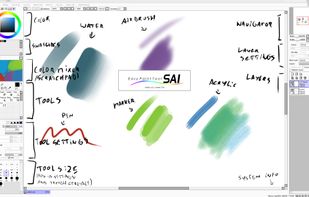
PaintTool SAI is high quality and lightweight painting software, fully digitizer support, amazing anti-aliased paintings, provide easy and stable operation, this software make digital art more enjoyable and comfortable.

Cost / License
- Pay once
- Proprietary
Application typeApplication types
Platforms
- Windows


Features
PaintTool SAI News & Activities
Highlights All activities
Recent News
No news, maybe you know any news worth sharing?
Share a News TipRecent activities
- namdx1987 liked PaintTool SAI
- Maria-Oliver liked PaintTool SAI
- crse added PaintTool SAI as alternative to Kala Paint
 POX added PaintTool SAI as alternative to ItsPaint
 luskus_deus added PaintTool SAI as alternative to Ruwa
 crse added PaintTool SAI as alternative to Umoupen
- crse updated PaintTool SAI
 POX added PaintTool SAI as alternative to Mojave Paint
 justarandom added PaintTool SAI as alternative to ArcBrush
 NativeAI00 added PaintTool SAI as alternative to RendrFlow


Featured in Lists

A list with 422 apps by AmileyaRyver without a description.
List by AmileyaRyver with 422 apps, updated
Drawing software are usually very rich in options and with interfaces that are often complicated, which creates a...
List by Paul with 11 apps, updated

Art of All kinds
List by HCShannon with 15 apps, updated
What is PaintTool SAI?
PaintTool SAI information
Developed by
 SYSTEMAX Software Development
 Licensing
Proprietary and Commercial product.Pricing
One time purchase (perpetual license) that costs $49.Alternatives
99 alternatives listedBadge
Get an embeddable badge for PaintTool SAISupported Languages


Comments and Reviews
It wasn't until I used Paint Tool SAI, that I had fun learning to use my Wacom tablet to draw. That's because the program is compact, with just enough features that are easy to learn and use. So, you'll find things like line-art layers with simple vector tools, masks, clipping and layer groups, but you won't find guides (except when transforming a selection) or rulers. But not everyone needs extra design features like that, just to draw what they want. SAI is a good application for a notebook or laptop, where you just want to draw something on the spot, and save it as a PSD file to import to other programs later. For what it is, SAI is a **gem **of program, but if you want extra features like guides, animation, or even filters, this is not for you.
Paint Tool Sai is legendary for how fast its brush engine is. All other art programs feel sluggish by comparison. It has perspective guides and nice vector art tools for line art. And nowadays it finally has scatter brushes (although making your own custom brushes is giant pain in the ass compared to ANY other art program)
If those are enough for you or if your computer lags while using other art programs, then Paint Tool Sai might be for you. If i had a powerful computer, i would rather use Krita, CSP or Photoshop, rather than Sai. But as it is, all those other programs lag so much, they are practically unusable (i either have to limit myself to 1500 x 2000 sized canvases or accept that my brush strokes will appear on the screen seconds after i make them. In comparison, in Sai i can paint on a 8000 x 8000 canvas, and it will still feel snappy)
I like it because it’s easy to use when it’s on youtube
Used it for years, easy to use. Get SAI2 if you want other options like gradients, text, blur, etc.
Because I never used it before and I wanna check it out to see how it goes when I edit
Cause I love to draw and I really want to edit and draw
personally just most compatible for how I work digitally, also.... i have it fully DL'd for free u '''