Pasta icon
Pasta icon

Pasta

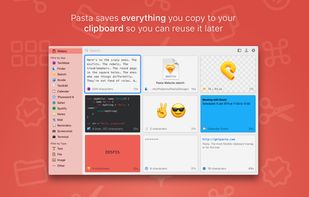
Pasta is a beautiful and flexible clipboard manager for the mac. It saves everything you copy to your clipboard so you can reuse it later.
Pasta screenshot 1

Cost / License

  • Freemium (Pay once)
  • Proprietary

Application type

Platforms

  • Mac
4likes
0articles

Features

Pasta News & Activities

Highlights All activities

Recent News

No news, maybe you know any news worth sharing?
Share a News Tip

Recent activities

  • Gisti icon
    viktor-kz added Pasta as alternative to Gisti
  • Relic icon
    heisdancingdancing added Pasta as alternative to Relic
  • everclip CLI icon
    jerlendds added Pasta as alternative to everclip CLI
  • lokeshgovindu added Pasta as alternative to PasteJUmp
  • Klipto icon
    Klipto added Pasta as alternative to Klipto
  • PasteDaemon icon
    Armand-Halbert added Pasta as alternative to PasteDaemon

  • McDitto icon
    Bert-Verhelst added Pasta as alternative to McDitto
  • RealtimeClipboard icon
    akshaynikhare added Pasta as alternative to RealtimeClipboard
  • Pluks icon
    parth-dixit added Pasta as alternative to Pluks
  • Clipory icon
    cautity added Pasta as alternative to Clipory

Pasta information

  • Developed by

    Wonderbit SLU.
  • Licensing

    Proprietary and Freemium product.
  • Pricing

    One time purchase (perpetual license) that costs $6 + free version with limited functionality.
  • Alternatives

    140 alternatives listed
  • Badge

    Get an embeddable badge for Pasta
  • Supported Languages

    • English

AlternativeTo Categories

Office & ProductivityFile Management

Popular alternatives

View all
Pasta was added to AlternativeTo by Paul on and this page was last updated .
No comments or reviews, maybe you want to be first?

Official Links

What is Pasta?

Pasta is a beautiful and flexible clipboard manager for the mac. It saves everything you copy to your clipboard so you can reuse it later.

Pasta is free to use. However, the free version only keeps the latest 20 clippings in your history. The Pasta Pro upgrade unlocks this limitation as well as the Collections feature.

FILTER BY APP AND TYPE

Filter your clippings by the app where they were copied or by what they contain. Finding a clipping has never been so easy.

COLLECTIONS Pro Feature

Organize your clippings into collections.

LIGHTNING FAST SEARCH

Pasta's powerful search can find clippings by content, application, type or even the window's name.

YOUR PASSWORDS ARE SAFE

When copying sensitive information from apps like 1Password, Pasta will obfuscate it on screen and will encrypt it when saved to disk.

SAVE UP TO 1000 CLIPPINGS Pro Feature

You can save up to a thousand clippings in your history. The free version only saves the latest 20 clippings.

FLEXIBLE GRID INTERFACE

Pasta's flexible grid interface helps you to better see your clipboard history so you can quickly find what you're looking for.

FAST AND UNOBTRUSIVE

Bring up Pasta with a keyboard shortcut or using the menubar, double-click the clipping you want to restore, Pasta then gets out of your way.

LIGHT AND DARK MODES

Pasta supports macOS Mojave's Light and Dark modes. This is the best feature of all :)

AND MUCH MORE

  • Works nicely with Universal Clipboard
  • Quick look images, text, website links, etc.
  • Enhanced representation of color codes, calendar events, links, etc.
  • Touch Bar support
  • Shortcuts for everything. You won't need the mouse
  • Use the anchor button to keep the window on top
  • Drag and drop clippings onto other applications