
P
P

Pause Focus

Desktop Pomodoro timer that turns breaks into illustrated, two-minute desk exercises chosen for eye, body, mind, mood or energy needs. It offers accessible movement alternatives, custom work-break rhythms, a floating timer, office-day scheduling, and local exportable tracking.
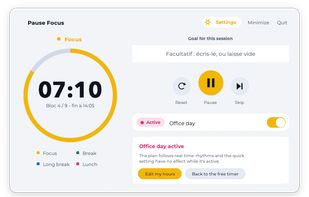
 Start your work session with Pause Focus. The timer displays your remaining focus time, automatically triggers breaks, and shows your daily goal.

Cost / License

  • Freemium (Pay once or Subscription)
  • Proprietary

Application type

Platforms

  • Mac  macOS 12 or later. The app is not notarised by Apple, so on first launch use right-click Open instead of a double-click.
  • Windows  Installs per-user, so no administrator rights are required. Windows 10 or later.
  • Online
1like
0articles

Features

Properties

  1.  Support for Themes
  2.  Distraction-free
  3.  Privacy focused

Features

  1.  Ad-free
  2.  Reminders
  3.  Task Time Tracking
  4.  Pomodoro Timer
  5.  Dark Mode
  6.  Works Offline
  7.  Offline
  8.  Timer

Pause Focus News & Activities

Highlights All activities

Recent activities

Pause Focus information

  • Developed by

    FR flagPause Feel Good
  • Licensing

    Proprietary and Freemium product.
  • Pricing

    One time purchase ranging between $3 and $4, and / or subscription that costs $75 per month + free version with limited functionality.
  • Alternatives

    26 alternatives listed
  • Badge

    Get an embeddable badge for Pause Focus
  • Supported Languages

    • English
    • French
Pause Focus was added to AlternativeTo by JohnJackHouzi on and this page was last updated .
No comments or reviews, maybe you want to be first?

What is Pause Focus?

Most Pomodoro timers count down and stop there: the break stays an empty slot you fill with coffee or scrolling.

Pause Focus asks what is tiring you at the end of each work session - eyes, body, mind, mood or energy - then walks you through a short illustrated exercise for it, one step at a time. Two minutes, sitting at your desk, no mat and no gym clothes.

  • 60 guided, illustrated breaks across five families
  • Every break has an "Otherwise" variant: the same benefit through a different movement, for a sore shoulder, reduced mobility or a wheelchair. Free in every plan.
  • Three built-in rhythms (25/5, 50/10, 20/8) plus your own
  • Office-day mode plans the whole day from your arrival time, departure time and lunch break
  • A floating timer stays visible without keeping a window open
  • No account, no server, works offline. The session log is a local file you can export to CSV or JSON.
  • Light and dark themes

The exercises are based on documented occupational-health and ergonomics guidance, cited inside the app: INRS, CCOHS, American Academy of Ophthalmology, Harvard Health Publishing.

The free version is not a crippled demo: the timer is complete and 15 guided breaks are included. A paid plan will unlock all 60 breaks, office-day mode and full history.

On Windows the installer is per-user - no administrator rights required, which matters on a work machine. macOS 12 or later, Windows 10 or later.

