


Super Productivity
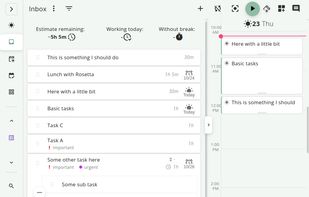
Free, open-source software offering task management and time tracking across Linux, MacOS, and Windows with Jira, GitHub, and GitLab integration, plus a pomodoro timer for breaks and focus. Designed with privacy in mind, it requires no user data collection or registration.

Cost / License
- Free
- Open Source (MIT)
Application typeApplication types
 EU
EUPlatforms
- Mac
- Windows
- Linux
- Online
- Android
- iPhone
- Chrome OS
- Android Tablet
- iPad
- Self-Hosted
- AppImageHub
- Snapcraft
- Flathub
- F-Droid
- Flatpak
- AppImage


Features


Super Productivity News & Activities
Recent News
- POX published news article about Super Productivity
 Super Productivity 14 released with support for plugins, enhanced calendar view, and more
Super Productivity 14 has been released, maintaining its position as an advanced to-do list app equ...

Recent activities
 Daniel-Lebe added Super Productivity as alternative to Committo
 Vladislav-Likh added Super Productivity as alternative to DailyGrind
 skad123 added Super Productivity as alternative to Fluorine
 Vadim-Egorov added Super Productivity as alternative to PomoFriends
 Egor-Zharinov added Super Productivity as alternative to Pomodoist
The best open source todo app I've ever used. Simple yet feature-rich, extremely customisable, works perfecty both on smartphone and on desktop. I like the fact that I have full control over my data. One of my absolute favourite apps.
- Polypl0id liked Super Productivity
 nojusmorkunas added Super Productivity as alternative to Conatus
- demijan77777777 liked Super Productivity


Featured in Lists

This guide is designed for anyone looking to take greater control of their digital life by choosing open-source...
How are you? In this list I bring you a variety of alternative software to those from Microsoft, and also that these...

A list with 568 apps by AmileyaRyver without a description.



What is Super Productivity?
Super Productivity information
Developed by
 Johannes Millan
 Licensing
Open Source (MIT) and Free product.Written in
Rating
Average rating of 4.8Alternatives
374 alternatives listedBadge
Get an embeddable badge for Super ProductivitySupported Languages

AlternativeTo Categories
Office & Productivity, Backup & Sync, Security & Privacy, Sport & Health, Business & CommerceApple AppStore
- Updated
- 4.75 avg rating
GitHub repository
- 22,097 Stars
- 2,053 Forks
- 1459 Open Issues
- Updated


Comments and Reviews
Simple yet feature-rich, works both as a desktop app and in your browser! You have full control over your data :)
The best open source todo app I've ever used. Simple yet feature-rich, extremely customisable, works perfecty both on smartphone and on desktop. I like the fact that I have full control over my data. One of my absolute favourite apps.
Extremely customisable and easy to set up.
Every productivity app put into one while being open source for free!
Best todo app that I've used - both simple and sophisticated. Been using it for 5+ years.
I enjoy using the app. The UI is really intuitive and beautiful. It's one of the apps that at the base of it is not fun to use, but due to the implementation of the UI and the UX, it's very nice to use. There are issues that happen with the synchronization of the data between devices (I'm using a next cloud instance on my VPS). The db gets corrupt sometimes which causes it to revert some updates of the tasks. This is the biggest problem of this app.
Still, I prefer it for my personal use to paid and proprietary software.
After trying and testing a ton of todo apps, list making apps, tasks apps, habit apps, and so on, THE best I've found that works on desktop as well as mobile devices and synch properly was SuperProductivity. I don't use time tracking, though, but the ability to switch from lists to panels, to calendar and agenda is simply awesome. Highly recommended.