
PC Tweaker icon
PC Tweaker icon

PC Tweaker

PC Tweaker is designed to evaluate the health of your computer system, track resource utilization, and allow you to implement optimizations. Recommended for gaming.
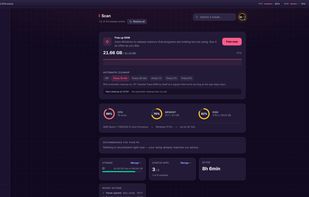
PC Tweaker screenshot 1

Cost / License

  • Freemium (Subscription)
  • Proprietary

Application type

Platforms

  • Windows
2likes
0articles

Features

Properties

  1.  Lightweight

Features

  1.  Ad-free
  2.  No Tracking
  3.  Works Offline
  4.  Dark Mode
  5.  No registration required
  6.  Delete Temporary Files
  7.  System Tweaker
  8.  Performance Monitoring

PC Tweaker News & Activities

Highlights All activities

Recent activities

PC Tweaker information

  • Developed by

    IT flagAurelioAvila
  • Licensing

    Proprietary and Freemium product.
  • Pricing

    Subscription ranging between $9 and $74 per month + free version with limited functionality.
  • Written in

  • Alternatives

    2 alternatives listed
  • Badge

    Get an embeddable badge for PC Tweaker
  • Supported Languages

    • English
    • French
    • German
    • Spanish
    • Italian
    • Portuguese

AlternativeTo Categories

OS & UtilitiesGamesGaming SoftwareDevelopment

GitHub repository

  •  21 Stars
  •  0 Forks
  •  0 Open Issues
  •   Updated  
PC Tweaker was added to AlternativeTo by Aurelio Avila on and this page was last updated .
No comments or reviews, maybe you want to be first?

Official Links

What is PC Tweaker?

PC Tweaker is a Windows tuning and maintenance application by Aurelio Avila. It brings performance settings, privacy controls, hardware readings and cleanup tools into one interface.

Inspect before applying: review the registry values or commands involved in a tweak, save the previous state of supported settings and restore them individually when needed. Restoration does not recover permanently deleted caches or replace a full system backup.

The free version includes Windows tweaks, system scans, startup tools and integrity checks without requiring an account. Pro adds Game Sessions, gaming presets, guided repair, selective cookie cleanup and advanced file and drive tools. Hardware-specific features depend on the capabilities of the device.

Current Windows installers are digitally signed by Aurelio Avila and timestamped. Source code is available for inspection under a proprietary, source-available license; it is not OSI-approved open source.

Pro is available through monthly and annual subscriptions. The official website currently lists EUR 9.99 per month or EUR 59 per year. Existing Lifetime licenses remain supported. See the official website for current terms and pricing. Pro activation and periodic license validation require an internet connection.

Compare changes under the same workload and keep only those that help your machine. PC Tweaker does not guarantee higher FPS, lower latency or compatibility with every game.

