


PDFsam Basic
232 likes
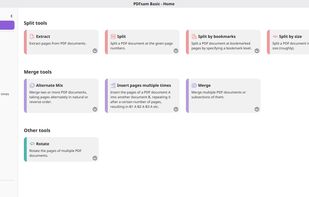
PDFsam Basic is a free and open-source desktop application for splitting and merging PDF files. It runs entirely on your own computer, so your files are never uploaded anywhere and it works fully offline.

Cost / License
- Free
- Open Source (AGPL-3.0)
Application type
 EU
EUPlatforms
- Mac
- Windows
- Linux


Features
PDFsam Basic News & Activities
Highlights All activities
Recent News
No news, maybe you know any news worth sharing?
Share a News TipRecent activities
- namdx1987 liked PDFsam Basic
- andreavacondio updated PDFsam Basic
 PDFParrot added PDFsam Basic as alternative to PDFParrot Merge
 dcarrero added PDFsam Basic as alternative to Reader Split PDF
 POX added PDFsam Basic as alternative to JOPDF
- pdfops liked PDFsam Basic
 Eelcos added PDFsam Basic as alternative to Fabreasy PDFixer
 osenpa added PDFsam Basic as alternative to Osenpa PDF Tools
 OrdinaryPerson added PDFsam Basic as alternative to PDF Reader Pro (by ahmmedrejowan)
- hakki liked PDFsam Basic


Featured in Lists

These are all the software I use on my windows machine. I am privacy freak. So, I mostly use open source software....
List by sam with 100 apps, updated

There is no doubt that Adobe Suite is great, even in some case it's probably the best. But you can be mad...
List by Darlene Sonalder with 72 apps, updated

A list with 807 apps by AmileyaRyver without a description.
List by AmileyaRyver with 807 apps, updated

What is PDFsam Basic?
PDFsam Basic information
Developed by
 Andrea Vacondio
 Licensing
Open Source (AGPL-3.0) and Free product.Pricing
One time purchase (perpetual license) ranging between $59 and $129.Written in
Rating
Average rating of 3.8Alternatives
154 alternatives listedBadge
Get an embeddable badge for PDFsam BasicSupported Languages

AlternativeTo Categories
File Management, Office & ProductivityGitHub repository
- 4,570 Stars
- 398 Forks
- 123 Open Issues
- Updated



Comments and Reviews
PDFTK Builder [1] and PDFsam [3] are the only free portable apps able to split or merge more than 140 pages. If you need a free portable app able to split or merge 147 pages, you can use PDFTK Builder [1], which is available only in english, however. PDFsam is also portable and availaible in many languages (german also). 7-PDF Split & Merge [2] (german + english) can split only max. 50 pages and merge max. 5 files for free. If you want to to split or merge more than 50 pages you must pay 10 EUR for "7-PDF Split & Merge PRO".
[1] PDFTK Builder
[2] 7-PDF Split & Merge
[3] PDFsam Basic
[Edited by em4020, April 30]
I have split 600+ page electronic textbooks with PDFSam with no trouble.
Until now PDFSam had no tag "portable" and I did not know, hat there is a portable version until now!
Today I have added the tag "portable" to PDFsam. Thank You dthatcher7 for Your interesting information!
Quick review. Purchased PDFsam Enhanced 5 a while ago. Couple of problems, that are inacceptable:
Rating: Between 2-3 stars for me. I have not explored ALL features and details. The not working license (after some 2-3 years) and the disappeared installer is no-go for me.
[Edited by L9828346621, November 20]
I use this for scanning double-sided documents on a non-duplex scanner ADF. You scan all the pages once, flip the stack and scan the other side, and then use the Alternative Mix function. There aren't many programs that can do this and they others I tried were hard to use or expensive (or both). Paperport, which came with my scanner, could do this but is now defunct and won't install on Windows 11 so I was happy to find this free alternative.
Almost unusable in the basic version, as you cannot delete pages etc. This is possible in PDFsam Visual, which costs 29,00 € as a yearly subscription price or 49,00 € as a perpetual license. The most powerful version, PDFsam Enhanced, is only available as a subsciption from $ 69 up to 129 $ per year, which is way too expensive.
PDFsam Visual should be satisfying the most needs, like merge, split, delete etc. I will test the program in more detail.
Anyway, there are less expensive or even free programs which do the job similarly well.
I bought a perpetual license of PDFsam Visual for 49,00 € a while ago, and the software does the most needed tasks quite well, in my opinion. But I think, updates are only free within the same major version, like 6 per example. You’ll have to pay for an upgrade from 6 to 7, which is not what I understand by “permanent.”
Bait-and-switch installer, wanted the basic but it installed both basic AND "enhanced," and the only way to do the edit I needed was locked behind a paywall.
I purchased the enhanced version feeling great about supporting a developer that contributes to open source; and finished up bled dry on a renewal the company refuses to refund despite me requesting the refund within days of the renewal; and for a product that NEVER worked after the first 3 months due to the login failing (Note: My password as stored in the password manager has NOT changed). I'm out of pocket $215 AU and feeling abused. I don't trust these guys
Hidden cross sale for the Enhanced Version resulting in an additional charge. After three days the enhanced version has not been delivered yet and customer support is non responsive. Had to file a dispute with my bank to try and get my money back. Whatever you do, stick to the free and open source version and do not buy!