Osenpa PDF Tools icon

Osenpa PDF Tools

Free local-first Windows PDF tools for merging, splitting, compressing, converting, OCR, watermarking, protecting, and cleaning PDFs.
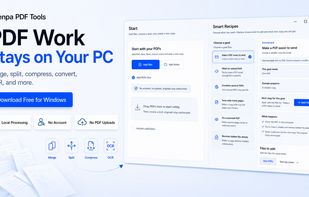
Osenpa PDF Tools keeps PDF work local on Windows with merge, split, compress, convert, OCR, and smart workflow shortcuts. No account, no PDF uploads, and safe output copies for everyday document tasks.

Cost / License

  • Free
  • Proprietary

Platforms

  • Windows  Works on Windows 10 and Windows 11.
0likes
0comments
0articles

Features

  1.  OCR
  2.  Password protection
  3.  Batch processing

Osenpa PDF Tools News & Activities

Highlights All activities

Recent activities

Osenpa PDF Tools information

  • Developed by

    Osenpa
  • Licensing

    Proprietary and Free product.
  • Alternatives

    9 alternatives listed
  • Supported Languages

    • English
    • Turkish
    • German
    • Spanish
    • French
    • Italian
    • Portuguese
    • Russian
    • Arabic
    • Hebrew
    • Hindi
    • Indonesian
    • Japanese
    • Korean
    • Vietnamese
    • Chinese
Osenpa PDF Tools was added to AlternativeTo by osenpa on and this page was last updated .
No comments or reviews, maybe you want to be first?

What is Osenpa PDF Tools?

Osenpa PDF Tools is a free local-first Windows PDF utility for practical PDF workflows. It helps users merge PDFs, split files by page ranges, organize pages with previews, compress PDF copies, convert images to PDF, export PDF pages as images, run local OCR, create searchable PDF or text output where supported, add visual signatures and watermarks, protect PDFs, clean metadata, and process local files in batches.

The app is designed for users who want everyday PDF tools without accounts, subscriptions, browser upload limits, or cloud processing. Supported workflows run locally on the Windows PC, original files stay unchanged by default, and optional Windows Explorer right-click actions can send supported PDFs into common tools such as Merge, Split, Compress, Convert, OCR, Sign & Watermark, and Protect & Clean.

Official Links