
PecoFence icon
PecoFence icon

PecoFence

Free, open-source Windows 11 desktop organizer with automatic grouping, live folders, tabs and shortcut access to desktop files.
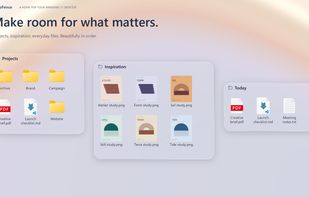
PecoFence desktop groups in the Liquid Glass theme, showing Projects, Inspiration and Today with demonstration files.

Cost / License

Platforms

  • Windows  Windows 11 x64. The settings panel requires Microsoft Edge WebView2 Runtime.
0likes
0articles

Features

Properties

  1.  Support for Themes

Features

  1.  Works Offline
  2.  Portable
  3.  No registration required
  4.  Dark Mode

PecoFence News & Activities

Highlights All activities

Recent activities

  • Dayuan-Jiang added PecoFence
  • Fences icon
    Dayuan-Jiang added PecoFence as alternative to Fences

PecoFence information

AlternativeTo Category

OS & Utilities

GitHub repository

  •  9 Stars
  •  1 Forks
  •  0 Open Issues
  •   Updated  
View on GitHub

Popular alternatives

View all
PecoFence was added to AlternativeTo by Dayuan-Jiang on and this page was last updated .
No comments or reviews, maybe you want to be first?

Official Links

What is PecoFence?

PecoFence is a free, open-source desktop organizer for Windows 11 x64, licensed under Apache 2.0. It organizes desktop files into movable, resizable panels and offers an alternative to Stardock Fences.

Features include:

  • Automatic grouping rules for file types, names, extensions, time and size. These rules keep files in their original locations.
  • Tabs that combine related groups, with support for detaching a tab into a separate panel.
  • Peek: Ctrl + Alt + Space brings desktop panels above the current application; Esc returns to the application.
  • Live folder panels with subfolder navigation and real-time updates.
  • Explorer context menus, drag and drop, copy/paste, thumbnails and icon, list or details views.
  • Double-click hiding, roll-up panels, layout snapshots and daily configuration backups.
  • Fluent and Liquid Glass themes, light/dark modes and per-panel appearance settings.

The native application is written in Rust. Its WebView2 settings panel loads on demand. The interface supports English, Simplified and Traditional Chinese, Japanese, Korean, German, French, Spanish, Brazilian Portuguese and Russian. No account is required to use the app. Downloads are available through Microsoft Store, a portable ZIP and winget.

Most native testing has been on Windows 11 25H2; testing across older versions and multi-display configurations is ongoing. The glass effect uses the static desktop wallpaper, not other application windows or live video wallpaper. Explicit file moves, renames and deletions affect real files, as in Explorer.