

PhotoGIMP icon
PhotoGIMP icon

PhotoGIMP

Open-source patch modifies the layout, shortcuts, and workspace of the image editor to resemble Adobe's design, providing custom splash screens, icon, and menus for ease of use, while retaining original features and supporting Windows, Linux, and macOS platforms.
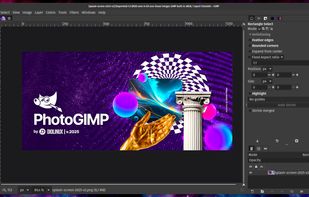
PhotoGIMP screenshot 1

Cost / License

Application type

Platforms

  • Mac
  • Windows
  • Linux
31likes
0articles

Features

Properties

  1.  Privacy focused

Features

  1.  No registration required
  2.  Color Picker
  3.  Pressure Sensitivity
  4.  Custom Brushes
  5.  Hardware Accelerated
  6.  Dark Mode
  7.  Ad-free
  8.  Works Offline
  9.  Extensible by Plugins/Extensions
  10.  Built-in Color Picker
  11.  No Tracking
  12.  Support for Layers
  13.  Drawing Tablet Support
  14.  Portable
  15.  Non Destructive Editing
  16.  Live Preview

PhotoGIMP News & Activities

Highlights All activities

Recent News

No news, maybe you know any news worth sharing?
Share a News Tip

Recent activities

PhotoGIMP information

AlternativeTo Categories

Photos & GraphicsSystem & Hardware

GitHub repository

  •  17,970 Stars
  •  732 Forks
  •  42 Open Issues
  •   Updated  
View on GitHub
PhotoGIMP was added to AlternativeTo by techdoctorusa on and this page was last updated .
No comments or reviews, maybe you want to be first?

Featured in Lists

This is a list of my favorite Linux programs (GUI / CLI) that I use daily. Not all of these apps are Linux exclusive.

List by Basic Pixel with 41 apps, updated

A list with 17 apps by techdoctorusa without a description.

List by techdoctorusa with 17 apps, updated
A list with 86 apps by Starflux923 without a description.

List by Starflux923 with 86 apps, updated

Official Links

What is PhotoGIMP?

PhotoGIMP is an open-source, community-developed patch designed to modify the interface of GIMP (GNU Image Manipulation Program) to closely resemble the layout of Adobe Photoshop. The patch is particularly designed for users transitioning from Photoshop to GIMP, offering a familiar environment to ease the switch.

PhotoGIMP comes with a set of features aimed at enhancing user experience. It offers a Photoshop-like tool layout, where tools are repositioned to mirror the layout typically found in Adobe Photoshop. It also features a custom splash screen that welcomes users upon startup. To maximize productivity, the default settings have been optimized to provide the largest possible workspace. The patch also incorporates Photoshop keyboard shortcuts, adhering to Adobe's official documentation for the Windows version, to facilitate user familiarity and efficiency. Additionally, PhotoGIMP includes a custom icon and name, courtesy of a dedicated .desktop file, allowing it to have its own unique identity in your system menu.
