PingKit icon
PingKit icon

PingKit

A free, privacy-first network toolkit for iPhone, iPad and Mac - 19 pro tools to scan, test, diagnose and monitor your network, with AI explanations and no ads or account.
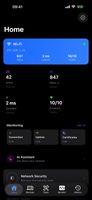
Dashboard

Cost / License

  • Freemium (Subscription)
  • Proprietary

Application types

Platforms

  • iPhone
  • iPad
0likes
0comments
0articles

Features

Properties

  1.  Privacy focused

Features

  1.  Dark Mode
  2.  No registration required
  3.  No Tracking
  4.  Website Monitoring
  5.  Ad-free
  6.  Trace Route
  7.  Uptime Monitoring
  8.  Network Scanner
  9.  Internet Speed Test

PingKit News & Activities

Highlights All activities

Recent activities

PingKit information

  • Developed by

    ZA flagPingKit Team
  • Licensing

    Proprietary and Freemium product.
  • Pricing

    Subscription ranging between $3 and $40 per month + free version with limited functionality.
  • Alternatives

    7 alternatives listed
  • Supported Languages

    • English
    • Arabic
    • Chinese
    • Czech
    • Danish
    • Dutch
    • Finnish
    • French
    • German
    • Greek
    • Hebrew
    • Indonesian
    • Italian
    • Japanese
    • Korean
    • Malay
    • Norwegian Bokmål
    • Polish
    • Portuguese
    • Russian
    • Slovak
    • Spanish
    • Swedish
    • Thai
    • Turkish
    • Vietnamese

AlternativeTo Category

Network & Admin
PingKit was added to AlternativeTo by snyman-ps on and this page was last updated .
No comments or reviews, maybe you want to be first?

What is PingKit?

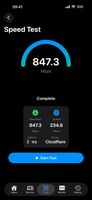
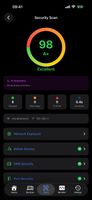
PingKit puts 19 professional-grade network tools in one app for iPhone, iPad and Mac - completely free, with no ads and no account required. Scan your local network and identify every connected device, test your real internet speed, run ping, traceroute and MTR, check open ports, inspect SSL/TLS certificates, look up DNS and Whois records, scan your network for security risks, and more.

Where most network apps stop at raw data, PingKit explains it. Its optional AI assistant answers plain-English questions like "Why is my internet slow?" and explains security findings without jargon. Device identification runs on-device using machine learning rather than a third-party cloud database.

Privacy is built in: all diagnostics run locally on your device, there are no accounts and no tracking, and cross-device sync uses your own private iCloud - not a server the developer can read.

The optional Guardian subscription ($2.99/mo or $24.99/yr) adds 24/7 monitoring via a free macOS menu-bar Agent, uptime watching, new-device and outage alerts, scheduled speed tests, and the AI assistant. Guardian Plus ($4.99/mo or $39.99/yr) adds TLS certificate-expiry monitoring, 90-day network history, ISO 27001 compliance PDF export, and an Apple Watch complication. All 19 core tools stay free regardless.

Included tools: Smart Diagnostics, Ping, Visual Traceroute, MTR, Connection Monitor, Port Scanner, Bonjour Browser, Security Scan, Device Discovery / LAN Scanner, Network Info, DNS Lookup, Whois, IP Geolocation, SSL Inspector, Speed Test, HTTP Analyzer, Subnet Calculator, Wake-on-LAN, and Network Interfaces. Plus Home Screen widgets and Siri Shortcuts.

Official Links