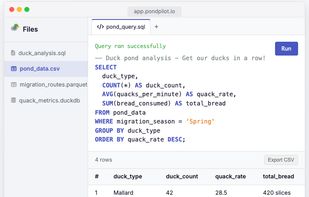
PondPilot is a blazing-fast, lightweight, 100% client-side AI-enabled data exploration tool that helps you analyze local & remote data with zero setup. Powered by DuckDB-Wasm and integrated AI assistance, it runs entirely in your browser - no install, no servers, no cloud uploads, complete privacy.
Key Features:
100% Client-Side Processing — All processing happens in your browser - no data [PondPilot - Get your data in a row ] ever leaves your device, ensuring complete privacy and security
AI-Powered SQL Assistant — PondPilot now [PondPilot v0.3.0: AI-Powered SQL and Persistent Databases - PondPilot ] includes an AI Assistant that can write, fix, and optimize SQL queries for you. Whether you're stuck on a complex join or just want to quickly explore your data, the AI Assistant has your back
Multiple Data Format Support — Works seamlessly with CSV, Excel, JSON, Parquet, SQLite, DuckDB files and more
Persistent Database — PondPilot now maintains a persistent writable database in browser cache that survives page reloads. It's like having a proper database workspace right in your browser!
Drag & Drop Interface — You can now drag and drop files directly into PondPilot. No more clicking through file dialogs – just grab your any of the supported file types and drop it right onto the interface. You can even drop entire folders, and PondPilot will automatically include all files inside
Technical Advantages:
High Performance — PondPilot opens a 2-gigabyte CSV in less than a second, because [Free SQL & Database Management Sandbox — Work with CSV, Excel, JSON, and DuckDB. PondPilot ] it does not copy or load the entire file into memory
Progressive Web App — Install PondPilot as a Progressive Web App for offline use
Read-Only Safety — PondPilot doesn't write to your files, ensuring your data stays safe
Real-Time Updates — Unlike similar tools, PondPilot accesses files directly without copying to browser cache - changes outside PondPilot are reflected in real-time
Smart Context — You can now mention datasets, queries, and scripts directly in your AI [Introducing PondPilot v0.4.0: Smarter Context and Unified Navigation ] prompts by typing @ followed by the object name. The magic happens when the AI assistant gets full context about the objects you're referencing
Use Cases:
Data analysts needing quick data exploration without setup
Excel file analysis without Excel installation
Complex SQL operations on various data formats
Privacy-focused data analysis that never leaves your device
Collaborative data exploration with embeddable widgets
Whether you're a data analyst, scientist, or engineer, PondPilot helps you get your data ducks in a row without the overhead of traditional data tools. The tool offers both web application access at app.pondpilot.io and Docker deployment options for local use.




 POX added PondPilot as alternative to SQL Studio
 protmaks added PondPilot as alternative to SQLite, ClickHouse, Apache Pinot and SlateDB
 T1A
T1A