




Preview
124 likes
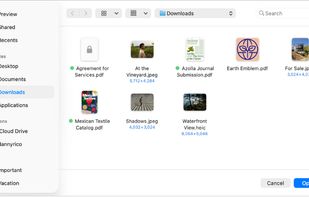
Native macOS app for viewing, annotating, and editing images and PDFs, featuring tools for cropping, rotating, resizing images, rearranging pages, full-screen viewing, markup, document merging, batch conversion, and export in multiple formats.

Cost / License
- Free
- Proprietary
Application typeApplication types
Platforms
- Mac
- iPhone
- iPad


Features
Preview News & Activities
Highlights All activities
Recent News
- Maoholguin published news article about iOS
 Apple launches version 26 across iOS, macOS, iPadOS and more with new Liquid Glass design
Apple has officially released iOS 26, macOS 26 Tahoe, iPadOS 26, watchOS 26, tvOS 26, and visionOS ...
- Maoholguin published news article about iOS
 Apple unveils version 26 across its OS lineup with new design language & several features
Apple announced major operating system updates at WWDC 2025, introducing several new features acros...

Recent activities
- lilith888 liked Preview
 OrdinaryPerson added Preview as alternative to PDFx (by AlexandrosGounis)
- Miygal added Preview as alternative to PDF Viewer, Editor & Password
 TheEmperorArt added Preview as alternative to Perfect PDF Reader
 doc-inspector added Preview as alternative to DocInspector
 sanusihassan added Preview as alternative to PDFSimplified
 icyhoty2k added Preview as alternative to Quick Image Viewer




Featured in Lists

A list of applications that are free alternatives to applications found in the Setapp subscription.
List by Kovah with 23 apps, updated

All the **tools** and apps I use to produce podcasts and content for [Podcasting Guru](podcastingguru.com).
List by podcastingguru with 7 apps, updated

A list with 28 apps by AmaniTheLionTLG without a description.
List by Amani The Lion with 28 apps, updated

What is Preview?
Preview information
Developed by
 Apple
Apple Licensing
Proprietary and Free product.Rating
Average rating of 3.7Alternatives
191 alternatives listedBadge
Get an embeddable badge for PreviewSupported Languages
AlternativeTo Categories
Photos & Graphics, Office & Productivity, System & HardwareApple AppStore
- Updated
- 1.88 avg rating


Comments and Reviews
This is not what preview most usefully does on MacOS. You can preview any file in finder via pressing the "space" button if you have an app that opens that file and supports preview feature. It's necessary for every OS.
Yes, you can, but that is a Finder function, which is not at all the same as the app "Preview."
It is not a good image viewer and not a good PDF viewer, either. For images, it won't allow me go through all images in a directory, such a basic functionality! For PDFs, it thinks every number is a phone number and makes it difficult to copy that number to the clipboard (no way to disable that). I had to stop using it completely and find alternatives for image previews and PDF viewing. So it is a totally useless app for me.
"You still cannot disable Data Detectors in Preview. Not even from the Terminal with the defaults command."
https://discussions.apple.com/thread/255513312?sortBy=best
The worst there can ever be. If you're from Win and new to macOS, especially use Mac for work, don't even bother to try using this god-be-cursing-it app. This sht is going to ruin ur life! Oh, why u might be wondering? It opens one image at a time, meaning you cannot click on an arrow button or hit the arrow key to view the next image. So if you want to see the next image, or any other image, u need to head back to the Finder, locate the image u wanna view, then double click on it to view it manually. Of course, some might say "oh u've been doing it in a wrong way this is THE MAC don't think of it as if it's the ugly hopeless Win u need to select all the images u wanna view then open the Preview app that's how u...." Man don't listen to their bull sht, find urself a decent proper image viewer that's not gonna waste ur time. I'm doing it now here. Or, if u may, head back to Win and leave all these shts behind. Sometimes, one can pretend that shts don't exist by simply ignoring them.
If you need some thing to view PDF and pictures, and sometime do some basic edit, Preview is absolutely a good tool.
I work a lot with images and PDF documents on Linux, Mac, and Windows system. I have tried a lot of image viewers, image editing tools, and PDF viewers. This one is, by far, the best image viewer I have used and gives one the ability to do basic image markup and manipulation. It also allows markup of PDF documents.
It also is very good at performing basic conversion of image and PDFs files from one format to another.
I've tried other image/PDF viewers but I keep coming back to Preview because of its capabilities.
Preview is simply beautiful!! It is so simple and just works as expected for viewing, light formatting and annotations! On top of that it supports a bunch of file-formats including RAW, even microsoft documents formats and lets you edit and sign PDF-files. I absolutely love it!
One downside is that I can't flick through my pictures easily in preview, but really my only complaint!