

Ravine Desk icon
Ravine Desk icon

Ravine Desk

A right-sized helpdesk for freelancers and small dev shops, with a branded client portal, billable-hours tracking, and a built-in AI assistant.
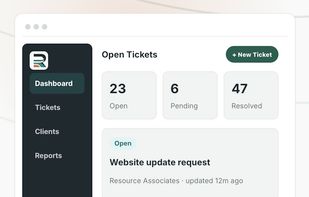
Ravine Desk screenshot 1

Cost / License

  • Subscription
  • Proprietary

Application type

Platforms

  • Online
  • Software as a Service (SaaS)
0likes
0articles

Features

Properties

  1.  AI-Powered

Features

  1.  Ad-free
  2.  WYSIWYG Support
  3.  Task Time Tracking
  4.  No Coding Required
  5.  Customer service
  6.  Client Portal
  7.  Helpdesk Ticketing
  8.  Multi-Tenant
  9.  Team Collaboration

Ravine Desk News & Activities

Highlights All activities

Recent activities

  • Robert88 reviewed Ravine Desk  

    I’ve been using Ravine Desk and found it quite easy to get around. The main features are straightforward, and I didn’t need much time to figure things out. I also like that the interface isn’t too complicated. Overall, it’s been a good experience so far.

  • ravineware added Ravine Desk
  • Maoholguin updated Ravine Desk
  • Deskhero icon
    ravineware added Ravine Desk as alternative to Deskhero, FreeScout, Libredesk and Freshdesk + 51 similar activities

Ravine Desk information

Our users have written 1 comments and reviews about Ravine Desk, and it has gotten 0 likes

Ravine Desk was added to AlternativeTo by Adrian Barnes on and this page was last updated .

Comments and Reviews

   
Robert Adam
1

I’ve been using Ravine Desk and found it quite easy to get around. The main features are straightforward, and I didn’t need much time to figure things out. I also like that the interface isn’t too complicated. Overall, it’s been a good experience so far.

Review from a new or low-activity account — shown here, but not counted in the app rating.

Official Links

What is Ravine Desk?

Ravine Desk is helpdesk software built for freelancers and small dev shops rather than large support teams. Each customer gets a branded client portal at their own subdomain where clients submit and track requests in one place, with magic-link access so clients never manage a password.

Tickets move through clear statuses (new, open, pending, resolved, closed) with priorities, drag-to-reorder, and assignment to technicians. Client email replies are pulled back into the ticket automatically, conversations support inline screenshots and file attachments, and internal team-only notes stay hidden from the client. Built-in billable-hours tracking produces clean time reports without spreadsheets.

Every plan includes an AI assistant (powered by Anthropic's Claude) that delivers a plain-English daily briefing of what needs attention, summarizes any ticket with likely causes and next steps, and on higher tiers triages new tickets and writes client-facing status summaries. The assistant only ever reads your own workspace data, never sends or changes anything on its own, and your data is not used to train AI models.

Pricing is flat per workspace with unlimited tickets on every plan, no per-seat or per-ticket fees, and a 14-day free trial with no credit card required. It's positioned as the middle ground between running support out of a shared inbox and the cost and complexity of enterprise tools like Zendesk, Freshdesk, and Intercom.
