




RescueTime
215 likes
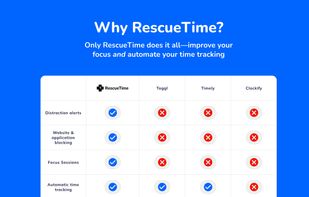
This tool automatically monitors computer use, providing detailed insights to enhance productivity and time management. It features goal setting and alerts to help conquer procrastination, while comparing user metrics to average data for broader context.

Cost / License
- Subscription
- Proprietary
Application typeApplication types
Platforms
- Mac
- Windows
- Online
- iPhone
- iPad
- Google Chrome
- Mozilla Firefox


Features

RescueTime News & Activities
Highlights All activities
Recent News
No news, maybe you know any news worth sharing?
Share a News TipRecent activities
 huble added RescueTime as alternative to Huble
- zolikonta liked RescueTime
 latreon added RescueTime as alternative to TabStyr
 POX added RescueTime as alternative to OwnTime
- codex added RescueTime as alternative to TrackFlow
 getapps added RescueTime as alternative to CoffeeTime
 enisb added RescueTime as alternative to taptime
 pikansj0s added RescueTime as alternative to CaseTrace
- bat9000 liked RescueTime
 jeongjin0 added RescueTime as alternative to drifty


Featured in Lists

A list with 568 apps by AmileyaRyver without a description.
List by AmileyaRyver with 568 apps, updated

I use these software on Windows
List by yaqinking with 63 apps, updated

A list with 221 apps by christineconnor without a description.
List by christineconnor with 221 apps, updated

What is RescueTime?
RescueTime Videos
RescueTime information
Developed by
 Jon Hruska, Robby Macdonell, Mark Wolgemuth
 Licensing
Proprietary and Commercial product.Pricing
Subscription ranging between $7 and $15 per month.Rating
Average rating of 3.1Alternatives
278 alternatives listedBadge
Get an embeddable badge for RescueTimeSupported Languages
AlternativeTo Categories
Office & Productivity, Remote Work & Education, Security & Privacy, Sport & Health, OS & Utilities, Business & CommerceApple AppStore
- Updated
- 5 avg rating


Comments and Reviews
If you're looking for convenience! Don't want to deal with configurations, setting up local reporting server, doing this or that. This is the best you can get. Yes, your data is at the mercy of the company, they say (like all companies) that you're data is safe and is not shared with any third party, but it's up to you to believe that. I've been using this for 4 years now.
RescueTime can only be used in an "online mode", where all your usage data is eventually transmitted to their servers for analysis and reporting. At least I didn't find any indication that the software could be configured differently. This might have some convenience benefits, especially when tracking multiple devices, although these could also be solved in a better way. Apart from the obvious privacy concerns, however, it also ties your use of the software to their service, which leads to all kinds of questions concerning mobile data usage, use while offline, future availability of the service, and a lot more. I personally wouldn't want my time tracking to be dependent on those questions and issues, and I don't think it should be for anyone. Forced online is, as in most cases, a major dealbreaker.
I recommend having a look at ManicTime, which offers pretty much all of the same functionality and benefits, while working locally and not being tied to some external server outside of your control. In fact, as a semi-obvious jab at RescueTime, "not a cloud-based service" is one of the major selling points they advertise on their website – as it should be!
I'm building an alternative that's getting pretty good (if I may say so myself). Try it out: ActivityWatch
Nice, thanks for the heads-up. I'll check it out and keep an eye on it :)
My two cents here. Rescuetime is not an "app blocking" app. This is not what it's made for. It's an app that can help you in understanding how you spend your time and makes you find time to do some "deep focus". Overall: it's used to improve your productivity. In addition, they have tools like the one that blocks distracting website.
Unfortunately I had to request a refund because currently they don't track correctly subdomains, and this is a crucial feature for me.
However, I appreciated the responsiveness, clarity and availability of their customer service. And the app itself is very nice: you install it, configure your job shift, integrate your calendar, and it works out of the box.
Absolutely recommended.
tracks activities
The content-control feature called FocusTime requires buying a subscription which costs $6-9 / month. I used to pay for a subscription, but I would prefer content-control software that does not require a subscription.
"Due to Apple restrictions RescueTime can’t track your time spent on apps and websites on your phone."
https://apps.apple.com/us/app/rescuetime/id966285407
I installed RescueTime this afternoon. I subscribed to the no-credit-card-required free trial. I wanted to test the Focus Sessions feature. Unfortunately, RescueTime says, "Unlock Focus Sessions with Premium." I thought that the free trial included the features of Premium? Otherwise, how can I test them? Also, I tried to view the time tracking on the website, but it says, "No Time."
It's good if you want to know metrics and what time is wasted during days, weeks and months.
I totally recommend it if you want to save more time using your computer in the online world.
i removed because i install on windows and Linux same time and tell me the system username must be unique , Very bad design , i recommended Wakatime.