Seston is built around the work radio and podcast actually involve: long takes, a great deal of cutting, and getting a voice to sound like it was recorded somewhere better than it was.
ENHANCE SPEECH
One pass that measures the recording and puts it right: the noise floor out, the room out, the microphone's tone corrected toward a speech curve, the pauses shut, the level evened, the loudness set, the peaks limited rather than clipped. The room is removed before the tone is measured, because reverberation has its own spectrum and would otherwise be corrected as though it were the microphone.
It reports every measurement and every decision - the room's decay time, how far the worst band was out of place, the gain applied. And it can be mixed back: the recording and the cleaned version are both kept, so the blend between them moves at any time without running anything again. Running Enhance twice reads the original recording, so the two passes never compound.
EXPORT AT A LOUDNESS, NOT NEAR ONE
Set a target - -16 LUFS for podcast, -14 for streaming, -19 for radio playout, -23 for EBU R128 broadcast - and the whole mix is measured to ITU-R BS.1770 first, then delivered at that target with the peaks limited to the ceiling. The report at the end is measured in the file that was written. If it says -16.0 LUFS, that is what the file is.
WAV at 16, 24 or 32-bit float, FLAC, MP3 from 64 to 320 kbps, AAC. Sample rates from 22.05 to 192 kHz, stereo or mono.
CUT AN HOUR DOWN WITHOUT DOING IT BY HAND
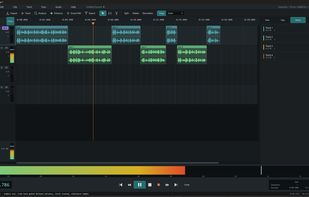
Smart Edit finds the dead air in a long take, takes it out, and lays what is left across two tracks head-to-tail - and tells you what it found before it changes anything.
RECORD A CALL, WITH EACH SIDE SEPARATE
Set the source to System playback and Seston records whatever the machine is playing - your guest on WhatsApp, a minister on Zoom, a reporter on Teams - while the call application carries on untouched. No plug-in, no bot joining the meeting, no link to send, nothing for the other person to install. Your own microphone is captured at the same moment onto its own track, so the two sides land separately and can be edited apart.
WRITE A LINE AND HAVE IT SPOKEN
Right-click a track, type or paste the script, pick a voice, and the spoken audio arrives as an ordinary clip. It runs on ElevenLabs with your own key and your own account.
NOTHING LEAVES YOUR MACHINE
No sign-up, no licence key, no telemetry, no analytics. Your recordings and sessions stay where they are. The only exceptions are the update check and Generate Speech while it is being used, and the privacy policy says exactly what each one sends and where.
Free to use.







 Hakan-E added Seston as alternative to Audacity, Hindenburg PRO 2, Sound Forge and Ocenaudio

 Hakan Emren

