


SoundSwitch
23 likes
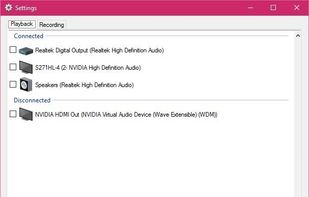
SoundSwitch makes it easier to switch playback devices (sound cards). With SoundSwitch you configure once between which Playback devices you want to toggle and then you can press Ctrl+Alt+F11 to toggle automatically!.

Cost / License
- Free
- Open Source (GPL-3.0)
Application type
 EU
EUPlatforms
- Windows


Features
SoundSwitch News & Activities
Highlights All activities
Recent activities
- hakki liked SoundSwitch
- brodertotte88 liked SoundSwitch
- Kargah liked SoundSwitch
SoundSwitch information
Developed by
 Antoine Aflalo
 Licensing
Open Source (GPL-3.0) and Free product.Written in
Alternatives
3 alternatives listedBadge
Get an embeddable badge for SoundSwitchSupported Languages

AlternativeTo Categories
Audio & Music, OS & UtilitiesGitHub repository
- 3,393 Stars
- 204 Forks
- 100 Open Issues
- Updated


Featured in Lists

This is the apps for Windows 11 that I would recommend to anyone who just got a PC ! The same list...
List by Darlene Sonalder with 142 apps, updated

I use these software on my Windows 10 Systems
List by Richard Rothacker with 31 apps, updated
A list with 47 apps by proxywork1 without a description.
List by proxywork1 with 47 apps, updated
Comments and Reviews
SoundSwitch is simple but efficient. You can easily switch between two audio output cards by clicking on the system tray icon, or by defining an hotkey. I previously used Audio switcher, but it had problems when it was not launched with administrator privileges. SoundSwitch just works flawlessly.