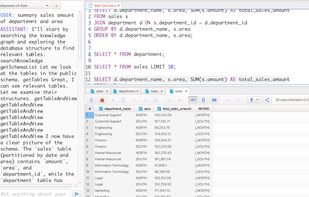
SQLife is a modern, cross-platform database management tool built with JavaFX for DBAs, developers and analysts. It connects to many RDBMS (Oracle, PostgreSQL, MySQL, SQL Server, etc.) and middleware (Redis, MongoDB, Kafka, RabbitMQ) through a rich, unified interface, with strong Windows and Linux support and MacOS optimization.
Supported Databases
Relational: Oracle (9i+, best 19c+), PostgreSQL (9.6+), MySQL (5.5+), MariaDB, SQL Server (2012+), SQLite, H2, IBM DB2, Apache Derby, HyperSQL, DuckDB, ClickHouse, Databricks, Snowflake.
Middleware: Redis, MongoDB, Kafka, RabbitMQ.
Features
- Comprehensive Connection Properties with keep-alive
- Object Management (tables, views, procedures, functions, triggers, indexes, sequences, synonyms, packages, materialized views, partitions)
- Multiple Connections and Tabs
- Intelligent Auto-Completion with code navigation and bracket matching
- SQL Syntax Highlighting, Formatting and Error Highlighting
- Data Export/Import (SQL, CSV, TSV, JSON, XML, Excel, HTML, Markdown, PNG; column mapping and parallel processing)
- Data Viewing and Inline Editing with multi-cell selection and clipboard support
- SQL History, Oracle Scheduler Jobs and DBMS_OUTPUT
- Dark Mode; Share Results via Local Network and Internet
- Plugin Management; MCP (Model Context Protocol); LLM Agent (OpenAI, DeepSeek, Ollama)
- Schema Comparison; Database Locks Monitor
- SQL Executor with multi-threading, batch commit and Lob/Blob support
- File Workspace with Git integration; Task View; Workspace State Recovery
- SSH Tunnel, Proxy (HTTP, SOCKS4/5), Outline View, Key Mapping
Latest Updates (2026-09-19)
- AI model selector beside the Send button: searchable, lists every provider with a configured key as provider/model.
- Taskbar/Dock notifications when the AI finishes or needs input while SQLife is unfocused.
- SQL outline keeps comments as blocks and renders Markdown headings.
- Column visibility menu on the grid # header, with hidden columns and persistent multi-column toggling.
- SFTP: upload/download whole folders, collapsible side tabs, favorite paths.
- Caret position in Text Viewer and other viewers.
- AI assistant sessions, MCP tools, activity logs, interactive pre-check/confirm forms.
- SQL suggestions expand Oracle packages into procedures and functions.
- Fixes: Linux tray startup (DBus StatusNotifierItem); password prompt for saved configs without a password; DB column comments in the fast grid menu; CSV/TSV paste no longer shifts into hidden columns; MCP SSE cleanup and 32-client limit; grid selection and column/view mode after refresh; Ctrl/Cmd opens a view's query in a new SQL editor.