

TreeXL icon
TreeXL icon

TreeXL

Scans Windows folders from File Explorer, exports hierarchical and flat Excel reports with duplicate detection, reclaimable space analysis, long path and permission audits. Color-coded, multi-sheet output stays local, requires no internet, never transmits data.
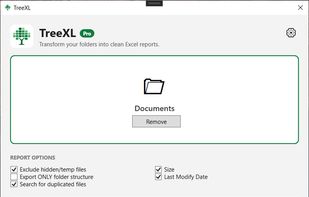
Main page

Cost / License

  • Freemium (Pay once)
  • Proprietary

Application type

Platforms

  • Windows  Window 10, Windows 11
0likes
0articles

Features

Properties

  1.  Lightweight

Features

  1.  No registration required
  2. File Explorer icon  Windows Explorer Extension
  3.  Works Offline
  4.  Ad-free
  5.  No Tracking
  6.  Context Menu extension
  7. Microsoft Excel icon  Export to Excel
  8.  Folder structure
  9.  Duplicate File Finder

TreeXL News & Activities

Highlights All activities

Recent activities

TreeXL information

  • Developed by

    IT flagLinfa Labs
  • Licensing

    Proprietary and Freemium product.
  • Pricing

    One time purchase (perpetual license) that costs $13 + free version with limited functionality.
  • Alternatives

    12 alternatives listed
  • Badge

    Get an embeddable badge for TreeXL
  • Supported Languages

    • English
    • Chinese
    • French
    • Spanish
    • Japanese
    • German
    • Italian
    • Portuguese
TreeXL was added to AlternativeTo by LinfaLabs on and this page was last updated .
No comments or reviews, maybe you want to be first?

Official Links

What is TreeXL?

TreeXL scans any Windows folder and turns its structure into a detailed, hierarchical Excel (.xlsx) report, launched directly from File Explorer's right-click menu.

Beyond simple export, TreeXL works as a lightweight file system audit tool: it detects duplicate files across the entire tree and suggests which copy to keep or delete based on age and location, calculates how much disk space could be reclaimed, flags paths exceeding Windows' 260-character limit, and reports folders or files that are inaccessible due to permission restrictions.

The generated report is color-coded and organized into multiple sheets: a collapsible hierarchical tree view, a flat sortable file list, and a dedicated duplicates sheet with keep/delete recommendations and reclaimable space totals.

All scanning happens locally on the device. No file names, paths, or content are ever uploaded or transmitted anywhere, and no internet connection is required to use the app.

Built for IT consultants, system administrators, data managers, legal and compliance teams, and freelancers who need to document, audit, or hand over folder structures and file inventories.

The free edition generates reports with up to 100 files and shows up to 2 duplicate groups. The paid edition removes these limits, unlocking unlimited report size and full duplicate detection, as a one-time purchase.

