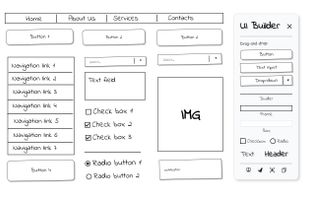
UI Builder – Mockup Tool is a fast Web Wireframe & Web Design Tool that lets you sketch UI layouts on any live page or on a new blank page. Quickly show clients possible design changes directly on the live website, without switching tools.
🔵 Built for designers, product owners, developers and business analysts who need instant mockups without leaving the page. Drag-and-drop hand-drawn widgets, resize them smoothly, edit text in place, snap a quick screenshot, and share — all 100 % locally in your browser for rapid prototyping.
🔹 Instant wireframes – turn any site (or a blank canvas) into a playground for mockups
🔹 True WYSIWYG – change button labels, headers and colours right on the screen
🔹 Keyboard friendly – Ctrl/? + C/V to duplicate, Delete to remove, Esc to cancel
🔹 Pixel-perfect exports – save the selected area as PNG or copy a screenshot to clipboard
🔹 Privacy first – no network calls, analytics or trackers; data lives in chrome.storage.local
🔹 Lightweight – injected only on demand, keeping everyday browsing fast
- Install & pin the toolbar icon
- Click UI Builder – the palette appears
- Drag widgets (buttons, headers, inputs, frames, dividers…) onto the page or blank canvas
- Resize / recolour until it looks right
- Press the disk icon, draw a marquee, confirm ? – get your PNG or paste straight to Slack / Figma / Jira
Perfect for:
🔹 quick idea sketching before opening heavy design tools
🔹 annotating client websites during live calls
🔹 teaching web-design basics without extra software
🔹 creating product screenshots for specs and tickets






 EU
EU


 ValmisLab