Vmtek icon
Vmtek icon

Vmtek

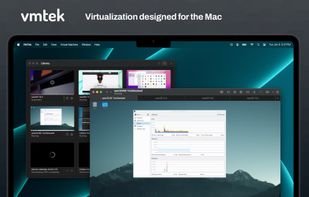
VMTek is the Mac virtualization platform you've been waiting for. Run multiple instances and versions of macOS*, Linux and other operating systems side-by-side on your Mac with ease. High performance Mac-native virtualization designed from the ground up to take advantage of...
Vmtek screenshot 1

Cost / License

  • Pay once
  • Proprietary

Application type

Platforms

  • Mac
1like
0articles

Features

  1.  Virtualization

Vmtek News & Activities

Highlights All activities

Recent activities

  • bnchndlr liked Vmtek
  • WinPodX icon
    POX added Vmtek as alternative to WinPodX

Vmtek information

  • Developed by

    Cyaneous
  • Licensing

    Proprietary and Commercial product.
  • Pricing

    One time purchase (perpetual license) that costs from $35.
  • Alternatives

    9 alternatives listed
  • Badge

    Get an embeddable badge for Vmtek
  • Supported Languages

    • English

AlternativeTo Category

Network & Admin
Vmtek was added to AlternativeTo by Paour on and this page was last updated .
No comments or reviews, maybe you want to be first?

Official Links

What is Vmtek?

VMTek is the Mac virtualization platform you've been waiting for. Run multiple instances and versions of macOS*, Linux and other operating systems side-by-side on your Mac with ease. High performance Mac-native virtualization designed from the ground up to take advantage of the latest macOS features and allow you to focus on getting work done - provisioning a new virtual machine with the OS of your choice takes just a few simple clicks. A streamlined, Mac-centric user interface makes the experience of working with VMTek virtual machines a joy.

Note: The free trial is not a subscription and we do not do any subscriptions. You will not be charged anything after the free trial. If you like VMTek, please supports its development by purchasing a license.

VMTek offers:

  • great performance
  • easy provisioning with automatic guest downloads
  • support for the latest virtualization standards
  • snapshots support with a fully graphical snapshot manager
  • file sharing with the guest
  • Mac trackpad support
  • NAT and bridged networking, multiple adapters
  • multiple fixed and removable disks, managed disks
  • native Retina display support
  • hardware accelerated graphics on macOS guests
  • audio playback and microphone support
  • VM cloning - online & offline
  • keyboard shortcuts support
  • copy and paste integration
  • automated installation of macOS guests
  • more in the works!
  • Note: macOS guests require an Apple Silicon Mac. MacOS 12 and later guests supported. Windows guests are not yet supported.