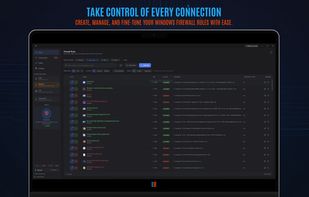
Windwall gives you control over the Windows Firewall built into Windows 10 and 11. It runs in the system tray and drives the native firewall directly — every rule it creates is a real Windows Firewall rule, enforced by Windows itself rather than by a second engine of its own. No kernel driver, no background service, no telemetry.
Live Connections Log
• Real-time monitoring — the program, PID, remote address, port and protocol behind every connection as it happens.
• Allowed traffic in green, blocked traffic in red.
• Search the live stream by process name, IP, port or protocol.
• Allow or block any program from the row it appeared on.
• When an unknown program is blocked reaching out, a prompt offers Allow or Block — one click writes the rule.
Three Security Postures
Switchable from the tray, applied across the Domain, Private and Public profiles at once:
• High — all inbound and outbound traffic is blocked, allow rules included.
• Medium — inbound is blocked, and outbound connections that do not match a rule are blocked.
• Low — inbound is blocked, outbound is allowed. The standard Windows default.
Also Included
• Full management of native firewall rules — create, enable, disable and delete.
• A "Block with Windwall" entry in the Windows right-click menu for any program or folder.
• Light and dark themes.
Free and Pro
The core is free, with no ads and no account. An optional lifetime Pro key adds Shield — a curated malicious-IP blocklist enforced as native firewall rules, plus malware-filtering DNS — along with a per-app traffic monitor with data limits, searchable connection history and rule collections.






 EU
EU


 tony_dev added Windwall as alternative to simplewall, GlassWire, Fort Firewall and NetGuard
 RoVo
RoVo 


No comments or reviews, maybe you want to be first?