


WinSCP
870 likes
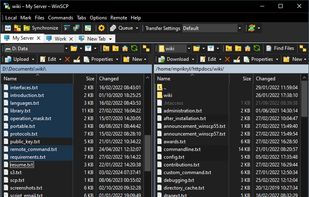
This powerful, open-source file transfer application supports Windows users with SFTP, FTP, SCP, and WebDAV protocols. It offers different GUI styles and tools for file synchronization and editing. Advanced users can automate and use key authentication with SSH, making it suitable for professionals.

Cost / License
- Free
- Open Source
Application typeApplication types
 EU
EUPlatforms
- Windows
- PortableApps.com
- Wine


Features


WinSCP News & Activities
Highlights All activities
Recent News
No news, maybe you know any news worth sharing?
Share a News TipRecent activities


Featured in Lists

These are all the software I use on my windows machine. I am privacy freak. So, I mostly use open source software....
List by sam with 100 apps, updated

Master List of all Apps and Software I use for both work and personal life.
List by Jimmy Briggs with 416 apps, updated

A list with 328 apps by christineconnor without a description.
List by christineconnor with 328 apps, updated
What is WinSCP ?
WinSCP information
Developed by
 Martin Prikryl
 Licensing
Open Source and Free product.Written in
Rating
Average rating of 4.6Alternatives
80 alternatives listedBadge
Get an embeddable badge for WinSCPSupported Languages

AlternativeTo Categories
Backup & Sync, File Management, File Sharing, Security & Privacy, Development, OS & Utilities, Remote Work & EducationGitHub repository
- 3,831 Stars
- 417 Forks
- 1 Open Issues
- Updated


Comments and Reviews
Absolutely brilliant. I no longer need a cloud service to sync my audio files between my PC and Android. All I need is the WiFi FTP Server app on my phone and this amazing program on my PC.
wish it had just a couple more features but it sure beats using filezilla
Works like a charm, this soft saved me today. 100% recommand
One of the most user-friendly (S)FTP clients out there.
It's completely free and still has a bunch of great features. Filezilla could be better but you have to pay.
Best option on Windows for SSH, SCP, rsync. Remember to try the SCP protocol when using rsync it will make it way faster.
Simply the best FTP program for Windows. It even syncs subfolders like ForkLift on MacOS and shows a list of changes before sync. That's what FileZilla can't do.