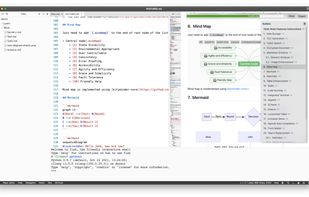
A highly extensible, AI-powered Markdown editor. Version control, AI Copilot, mind map, documents encryption, code snippet running, integrated terminal, chart embedding, HTML applets, Reveal.js, plug-in, and macro replacement.
Supports using various LLM large models for automatic completion, generation, and rewriting of text, making writing easier, more efficient, and more creative. (Extensions required)
Features:
• Open Source
The project source code is open source under the AGPL-3.0 license, hosted on GitHub, so you don't have to worry about the project's future upgrades and maintenance.
• Local Storage
All data is stored locally, and you can choose your own synchronization and backup solution (such as cloud disk, Git). Don't worry about the data privacy, network issues and service interruption risks of other cloud notes application.
• History Versions
Built-in document history version function, support document history version view and recovery, can easily view and restore previous versions.
• Document Encryption
Support single document end-to-end encryption, can easily store some work account passwords and other confidential information.
• Extended Markdown
Support table, footnote, catalog, mathematical formula, code block highlight, superscript, subscript, column and other extended syntax, to meet the needs of writing rich documents.
• Advanced Document
Support embedding HTML widgets, runnable code blocks, macro replacement statements, etc. in documents. Through code, your documents become powerful toolboxes.
• Plugin Extension
Support plugin extension, you can develop plugins by yourself, or install extensions in the extension center. There are more than 20 existing extensions, covering theme UI, graphics, artificial intelligence, Git operation, etc., and are still being further expanded.
• Multi-cursor Editing
Support multi-cursor editing, you can edit multiple positions at the same time, and you can easily batch modify text.
• Auto Complete
Support auto complete basic Markdown syntax, and auto complete provided by plugins. Support artificial intelligence OpenAI intelligent completion (need to install extension). You can also customize the completion content to facilitate the input of text (need to install extension).
• Format
Support formatting and beautifying Markdown text source code (need to install extension), you can format the selected text, or format the entire document.
• High Performance
Use Monaco editor (the core of VS Code editor) as the editor kernel, and enjoy the smooth editing experience.




 purocean

