Zefir Calendar icon
Zefir Calendar icon

Zefir Calendar

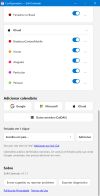
A Windows 11 system tray calendar that shows iCloud calendars, including shared ones, alongside Google Calendar, Outlook and ICS feeds.
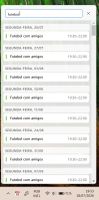
Zefir Calendar screenshot 1
Zefir Calendar screenshot 2
+3
Zefir Calendar screenshot 3

Cost / License

  • Freemium (Subscription)
  • Proprietary

Application type

Platforms

  • Windows
0likes
0articles

Features

Properties

  1.  Privacy focused

Features

  1.  No Tracking
  2.  Ad-free
  3.  Calendar Integration
  4. Google Calendar icon  Sync with Google Calendar
  5.  Dark Mode
  6.  Multiple Account support
  7.  Reminders
  8.  Calendar View
  9.  No registration required
  10.  Shared Calendar
  11.  CalDAV Support
  12.  Agenda
  13. Google Calendar icon  Google Calendar integration

Zefir Calendar News & Activities

Highlights All activities

Recent activities

Zefir Calendar information

  • Developed by

    BR flagYour Home
  • Licensing

    Proprietary and Freemium product.
  • Pricing

    Subscription ranging between $2 and $3 per month + free version with limited functionality.
  • Alternatives

    6 alternatives listed
  • Badge

    Get an embeddable badge for Zefir Calendar
  • Supported Languages

    • English
    • Portuguese
    • Spanish
Zefir Calendar was added to AlternativeTo by DiogenesMagnus on and this page was last updated .
No comments or reviews, maybe you want to be first?

Featured in Lists
If you live on an iPhone but work on a Windows PC, your iCloud calendar doesn't come along for the ride. Windows...

List by DiogenesMagnus with 7 apps, updated

Official Links

What is Zefir Calendar?

Zefir Calendar puts a full calendar in the Windows 11 system tray. Click the tray icon and a flyout opens with your month view and your events, without launching a browser or a full desktop client.

Its main difference from other tray calendars is iCloud support through CalDAV, including calendars that were shared with you by someone else. If your partner or your team shares an iCloud calendar with you and you work on a PC, those events normally never reach Windows at all.

Supported sources:

  • iCloud via CalDAV, personal and shared calendars
  • Google Calendar
  • Microsoft and Outlook accounts via Microsoft Graph
  • Any public or private ICS feed

You can create, edit and delete events directly from the flyout, get desktop reminders, and join meeting links with one click. It supports light and dark themes and follows the Windows 11 Fluent design.

On privacy: your events are never written to disk and never pass through an intermediary server. The app talks directly to each calendar provider from your machine, and your events only exist in memory while the app is running.

Available in English, Portuguese and Spanish. Distributed through the Microsoft Store with a 7-day full trial, after which it keeps working in a reduced free mode showing the current day, or unlocks completely with a monthly or yearly subscription.