

ZenCapture icon
ZenCapture icon

ZenCapture

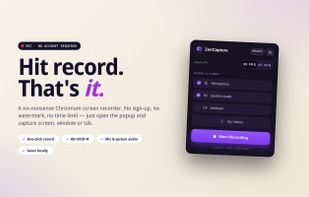
Free Chrome extension for screen recording with no time limit, no watermark, and no sign-up. All recordings stay on your computer.
ZenCapture screenshot 1

Cost / License

  • Free
  • Proprietary

Platforms

  • Google Chrome
0likes
0comments
0articles

Features

Properties

  1.  Lightweight
  2.  Privacy focused

Features

  1.  No registration required
  2.  Works Offline
  3.  Dark Mode
  4.  No Tracking
  5.  Support for 4K
  6.  Ad-free
  7.  Screen Recording
  8.  Record videos

ZenCapture News & Activities

Highlights All activities

Recent activities

ZenCapture information

  • Developed by

    isdevpro
  • Licensing

    Proprietary and Free product.
  • Alternatives

    51 alternatives listed
  • Supported Languages

    • English
    • Indonesian
    • Spanish
    • German
    • Chinese
    • Japanese
    • Korean
    • French
    • Russian
    • Ukrainian
    • Serbian
    • Turkish
    • Armenian
    • Azerbaijani
    • Kazakh
    • Portuguese
    • Turkmen
    • Vietnamese
    • Thai
    • Italian
    • Slovak
    • Slovene
    • Polish
    • Danish
ZenCapture was added to AlternativeTo by isdevpro on and this page was last updated .
No comments or reviews, maybe you want to be first?

What is ZenCapture?

A screen recorder for Chrome that captures without watermarks, time limits, or data uploads. ZenCapture records your full screen, application windows, or browser tabs with crisp 4K resolution and simultaneous audio. All processing stays local, ensuring privacy and control.

🎬 KEY FEATURES

  • Record screen, window, or tab using Chromium’s native picker
  • Resolution up to 4K with presets: Original, 4K, 1080p, 720p, 480p
  • Output as WebM (VP9/VP8+Opus) or MP4 (H.264+AAC) where WebCodecs supported
  • Capture microphone and system or tab audio, automatically mixed into one track
  • Overlay webcam picture-in-picture in 4 corner positions, 2 sizes
  • Pause and resume recordings; paused segments excluded from final duration
  • Customizable keyboard shortcuts: Alt+Shift+R (start/stop), Alt+Shift+K (pause/resume), Alt+Shift+S (popup)
  • My Videos library with thumbnails, rename, re-download, delete, and auto-cleanup
  • Zero host permissions – cannot read or modify any website content