Absolutely-Essential Browser Extensions - Nov 2024

GruvPuddlesGruvPuddles6 appsUpdated

These are the browser extensions I install on every browser I use or try, beit Chromium-based or Gecko/Firefox-based.

Mostly Privacy & Adblocking, and all pretty surface level. While simple, theyre as important as they are basic

(Last updated on 24/11/2024)

Copy a direct link to this comment to your clipboard
  1. Bitwarden icon
     Like

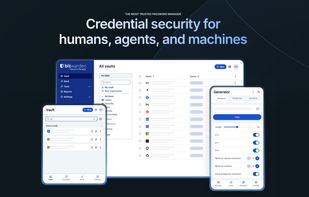
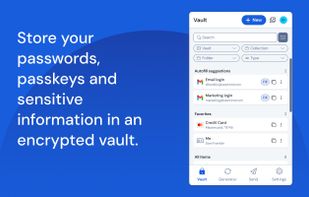
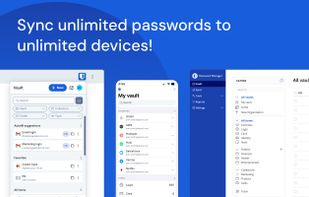
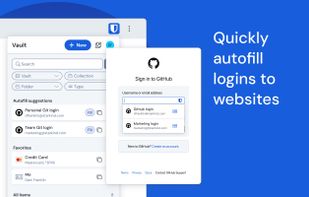
    Open-source password manager with AES-256 encryption and device sync. Store and access encrypted logins across platforms like iOS and Android.

    Cost / License

    • Freemium
    • Open Source

    Application type

    Platforms

    • Mac
    • Windows
    • Linux
    • Online
    • Android
    • iPhone
    • Android Tablet
    • iPad
    • Self-Hosted
    • Apple Watch
    • Snapcraft
    • Microsoft Edge
    • Vivaldi
    • Google Chrome
    • Flathub
    • Microsoft SQL Server
    • Tor Browser
    • Safari
    • F-Droid
    • Software as a Service (SaaS)
    • Flatpak
    • Cloudron
    • Docker
    • Opera
    • Chocolatey
    • Mono
    • Brave
    • AppImage
    • Mozilla Firefox
    • OpenAPK
    Bitwarden screenshot 1
    Bitwarden screenshot 1
    Bitwarden screenshot 2
    +11
    Bitwarden screenshot 3
    GruvPuddlesGruvPuddles’s note

    BY FAR the best password manager on the market. Outragously generous free-plan, unlimited passwords, more-than-adequate password generator, support for passkeys.. I could go on.

    If you aren't using a password manager, please, give bitwarden a try. It's the easiest way to have an extra layer of security when surfing the web.

  2. AdGuard icon
     Like

    AdGuard is the best way to get rid of intrusive ads and online tracking, and to protect your computer from malware. Make your web surfing faster, safer and more comfortable with AdGuard!.

    Cost / License

    • Freemium
    • Open Source

    Application type

    Platforms

    • Mac
    • Windows
    • Android
    • iPhone
    • Chrome OS
    • Android Tablet
    • HUAWEI AppGallery
    • iPad
    • Microsoft Edge
    • Vivaldi
    • Google Chrome
    • Samsung Galaxy Store
    • Safari
    • F-Droid
    • Android TV
    • Yandex Browser
    • Opera
    • Mozilla Firefox
    AdGuard screenshot 1
    Very good app for blocking ads. Use it!
    AdGuard screenshot 2
    +4
    AdGuard screenshot 3
    GruvPuddlesGruvPuddles’s note

    Ublock Origin was my go-to for a very long time, but since deploying AdGuard on my router, the AG extension is my primary adblocker. I use it less for literal adblocking, and more to ensure the network-level adblock is working as intended.

    If you aren't using a similar setup, uBlock, uBlock Origin or uBlock Lite are also excellent options.

  3. SponsorBlock is an open-source crowdsourced browser extension to skip sponsor segments in YouTube videos. Users submit when a sponsor happens from the extension, and the extension automatically skips sponsors it knows about.

    Cost / License

    • Freemium
    • Open Source

    Application type

    Platforms

    • Mac
    • iPhone
    • iPad
    • Microsoft Edge
    • Google Chrome
    • Mozilla Firefox
    • Safari
    SponsorBlock screenshot 1
    SponsorBlock screenshot 1
    GruvPuddlesGruvPuddles’s note

    An absolute godsend for youtube; auto-skipping of sponsored segments, intro/outros, and other annoyances - generated via user-submitted timestamps. As of writing (25/11/2024) it estimates to have saved me 52minutes of playtime in the ~6 months of use.

  4. GruvPuddlesGruvPuddles’s note

    Opensource User-Script manager, with handy search functions for the website you're currently visiting. Being able to import from a zip file makes backup super simple as well. If not for any other reason, the lil monkey icon is damn cute ??

  5. "Terms of Service; Didn't Read" (short: ToS;DR) is a project started in June 2012 to help fix the "biggest lie on the web": almost no one really reads the terms of service we agree to all the time.

    Cost / License

    • Free
    • Open Source

    Application type

    Platforms

    • Mac
    • Online
    • Android
    • iPhone
    • Microsoft Edge
    • Vivaldi
    • Google Chrome
    • Safari
    • F-Droid
    • Tor
    • Opera
    • Brave
    • Mozilla Firefox
    • iPad
    Website
Home Page
    Website
How it works
    Website 
Grade filter
    +16
    Website
Service details
    GruvPuddlesGruvPuddles’s note

    Super-simple way to get a rundown of a websites Terms of Use, making it easy to decide which websites/companies to avoid. At this point, it's no secret that 99.9% of us don't read lengthy T's&C's, so this is the next-best thing.

  6. Store bookmarks with related content, organize thematically with real-time collaboration and privacy focus, offering web clipper and cloud sync.

    Cost / License

    • Freemium
    • Proprietary

    Application type

    Platforms

    • Mac
    • Windows
    • Linux
    • Online
    • Android
    • iPhone
    • Android Tablet
    • iPad
    • Microsoft Edge
    • Vivaldi
    • Google Chrome
    • Safari
    • Yandex Browser
    • Software as a Service (SaaS)
    • Opera
    • Mozilla Firefox
    Raindrop.io interface with dark theme selected
    service description (Snapshot from homepage)
    (Snapshot from homepage)
    +5
    organize feature description (Snapshot from homepage)
    GruvPuddlesGruvPuddles’s note

    Though I'm certainly notr "married" to using Raindrop - it's been the most cohesive and feature-packed bookmark managers I've found.. it's good (great, even) but I still can't help but use the browsers in-built bookmark function for some reason ??

No comments so far, maybe you want to be first?