Beetroot icon
Beetroot icon

Beetroot

Free, open-source clipboard manager for Windows with local text and image history, OCR, search, and optional AI transforms.
Beetroot screenshot 1

Cost / License

  • Free
  • Proprietary

Application type

Platforms

  • Windows  Requires Windows 10 or later
6likes
0articles

Features

Properties

  1.  Support for Themes
  2.  Privacy focused
  3.  Lightweight
  4.  AI-Powered

Features

  1.  Dark Mode
  2.  No Tracking
  3.  Works Offline
  4.  Ad-free
  5.  OCR
  6.  Full-Text Search
  7.  No registration required

Beetroot News & Activities

Highlights All activities

Recent News

No news, maybe you know any news worth sharing?
Share a News Tip

Recent activities

Beetroot information

  • Developed by

    Max Nardit
  • Licensing

    Proprietary and Free product.
  • Alternatives

    59 alternatives listed
  • Badge

    Get an embeddable badge for Beetroot
  • Supported Languages

    • English
    • Russian
    • German
    • Spanish
    • Chinese
    • Japanese
    • French
    • Portuguese
    • Korean
    • Turkish
    • Italian
    • Polish
    • Dutch
    • Ukrainian
    • Thai
    • Hindi
    • Indonesian
    • Vietnamese
    • Czech
    • Hungarian
    • Romanian
    • Swedish
    • Danish
    • Finnish
    • Malay
    • Norwegian Bokmål

AlternativeTo Category

Office & Productivity

GitHub repository

  •  222 Stars
  •  0 Forks
  •  21 Open Issues
  •   Updated  

Popular alternatives

View all

Our users have written 1 comments and reviews about Beetroot, and it has gotten 6 likes

Beetroot was added to AlternativeTo by Max Nardit on and this page was last updated .

Comments and Reviews

   
TBayAreaPat
0

Uses Edge WebView2

Official Links

What is Beetroot?

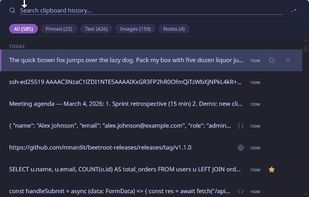
Beetroot is a free, open-source clipboard manager for Windows 10 and 11, created by Max Nardit. It keeps text and image history locally and provides keyboard shortcuts, search, OCR, and optional AI tools.

  • Persistent clipboard history for text and images, with starred items, notes, source-app information, and batch operations.
  • Fuzzy and regular-expression search, with filters for text, images, starred items, and notes.
  • Customizable global hotkeys, plain-text paste, and support for AZERTY, QWERTZ, and AltGr layouts.
  • On-device text extraction from images using the native Windows OCR engine.
  • Optional AI text transforms through OpenAI, Anthropic Claude, Google Gemini, DeepSeek, or local models via Ollama and LM Studio. Includes 10 built-in text prompts and custom prompts.
  • AI Vision with supported cloud or local models: read image text, describe images, extract data, summarize images, and translate image text.
  • Always-on-top and follow-cursor window modes, multi-monitor support, nine themes, accent colors, and customizable fonts.
  • Interface available in 26 languages.
  • Automatic database backups and recovery support.

Clipboard history is stored locally in SQLite. No Beetroot account is required, and the app has no ads or telemetry. Core clipboard features and native OCR work offline. Cloud AI is optional: it sends the selected content and prompt to the chosen provider, requires your own API key, and may incur provider charges. Cloud API keys are stored in Windows Credential Manager. Local AI connects to a model server running on your computer.

Beetroot is built with Tauri, React, TypeScript, and Rust, and is licensed under Apache 2.0. Source code, issue tracking, and contributions are hosted on GitHub. Downloads are available from GitHub Releases and the Microsoft Store.