


CapCut
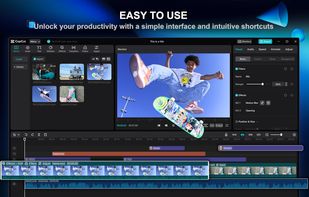
Free video editor offering multi-track timeline, trimming, splitting, speed adjustments, advanced filters, stickers, backgrounds removal, licensed music, speech-to-text, stabilization, customizable 4K 60fps export, and direct sharing to social platforms like TikTok and YouTube.

Cost / License
- Freemium (Subscription)
- Proprietary
Application type
Platforms
- Mac
- Windows
- Online
- Android
- iPhone
- Android Tablet
- iPad


Features
CapCut News & Activities
Recent News
- POX published news article about CapCut
 CapCut unveils Design Studio 2.0 with infinite canvas, AI design agent & pencil prompting
CapCut has unveiled Design Studio 2.0, marking a substantial upgrade to its web-based design platfo...
- Maoholguin published news article about CapCut
 ByteDance's apps like CapCut, Lemon8 and MarvelSnap banned in the US following TikTok ban
Following the TikTok ban in the U.S. and its subsequent removal from app stores, other popular apps...
- Maoholguin published news article about TikTok
 TikTok introduces Direct Post for seamless video uploads from third-party platforms
TikTok has introduced Direct Post, a feature allowing creators to upload videos directly from third...


Recent activities
- codematium added CapCut as alternative to Lyric Video Studio
- lilith888 liked CapCut
 SolaryKryptic added CapCut as alternative to Clipforge Studio
- rigoddd liked CapCut
- bulldogs liked CapCut


Featured in Lists

A list with 134 apps by tameresa without a description.

For Android & Online

The apps I have installed and use myself for day to day things, mostly as someone who has PP memory and subpar energy;...



What is CapCut?
CapCut Videos
CapCut information
Developed by
 Bytedance Pte. Ltd
 Licensing
Proprietary and Freemium product.Pricing
Subscription ranging between $4 and $7 per month + free version with limited functionality.Rating
Average rating of 4.1Alternatives
224 alternatives listedNews
3 news article related to CapCutBadge
Get an embeddable badge for CapCutSupported Languages
AlternativeTo Categories
Video & Movies, Photos & Graphics, System & HardwareApple AppStore
- Updated
- 4.61 avg rating


Comments and Reviews
Capcut is really impressive. It has a few limitations but I think it's a good place to start compared to Premiere or Resolve which can be intimidating.
By using CapCut you agree that Bytedance (TikTok) sell your face, voice, and likeness in ads, AI training, or even sell that footage to others!
I wouldn't touch it, if you really need a mobile editing software use : LightCut
If you need a WebEditor use Mastershot
If you are serious about video editing simply learn DaVinci Resolve
CapCut is easily the best mobile video editor for creators. The keyframe animation and auto-captions save so much time during post-production. While the desktop version is great, the mobile app remains unmatched for quick, high-quality social media edits. A must-have tool for any modern creator!
Love using CapCut because it's free and easy-to-handle. Use it to create home videos
I used to have that crappy Bandicut and switched to Filmora, but it’s paid, so I couldn’t really recommend it to my colleagues. For anyone who just needs simple cuts like I do, it’s the best. It’s very easy to use and handles basic tasks without any trouble.
It's now paywall!
used to be great free video editor but now even basic feature is pro only, and there is 3 export limit per week.