Deep Code — DeepSeek V4, Now Inside Claude Code
Imagine Claude Code's familiar interface, powered by DeepSeek V4's next-level reasoning — at a price that actually makes sense for daily use. That's Deep Code.
We built it for everyone who lives in code, design, lesson plans, research papers, or server logs. Whether you're a student debugging your first app, a designer prototyping interactions, or a sysadmin automating infrastructure, Deep Code removes the friction between you and powerful AI.
Why Choose Deep Code?
Seriously Cheaper - Deep Code runs on DeepSeek V4 Pro. You get the same elite coding intelligence the big names charge premium prices for — except your bill stays a fraction of the size. Bring your own API key and pay only for what you use.
Zero Terminal Hassle - No command-line gymnastics. Deep Code auto-installs and launches Claude Code for you. Double-click the app, and you're talking to DeepSeek V4 in seconds.
Your Workflow, Supercharged
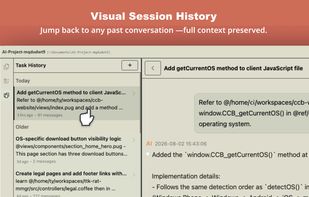
Visual Session History - Every conversation lives in a clean, split-pane browser. Jump back to yesterday's debugging session or last month's architecture review with one click. Context is never lost.
VS Code-Style File Explorer - Browse your project tree, double-click any file, and an @ reference drops straight into your chat. No memorizing paths. No tab-switching. Just point and ask.
Snippets That Work - Save your best prompts — the ones that nail code reviews, generate test cases, or summarize research. Double-click to drop them into any conversation. Build your personal playbook over time.
Speak Your Mind - Hit record and talk naturally for up to five minutes. Our context-aware AI cleans up your speech into structured, actionable prompts. Great for thinking out loud while walking or when typing feels slow.
Built for How You Actually Work
-
BYOK Freedom — Plug in your own DeepSeek API key. No middleman markups.
-
Model Switching — Hop between AI models across different projects without reconfiguring anything.
-
WYSIWYG Session Panel — See your full Claude Code session history rendered cleanly, not buried in terminal scrollback.
-
One-Click @-References — Reference files, functions, or folders instantly without typing paths.
-
Prompt Library — Save, organize, and reuse your most effective prompts forever.