




File Brain
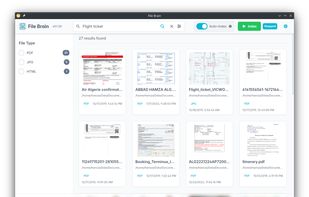
File Brain is a desktop application that helps you find files instantly using natural language. Instead of remembering exact filenames, you can ask questions like "flight ticket invoice", and File Brain uses semantic search to understand the meaning and show the...

Cost / License
- Free
- Open Source (GPL-3.0)
Platforms
- Windows
- Mac
- Linux


Features
File Brain News & Activities
Recent activities
- Wierzciu liked File Brain
- TBayAreaPat replied to a comment / review on File Brain
- TBayAreaPat replied to a comment / review on File Brain
- TBayAreaPat commented on File Brain
File Brain is “auto-indexing”. It detects changes in real time and updates the index instantly simialar to Flow Launcher. Note that not all similar programs use file-indexing which can add weight to the system, though this program claims to limit that. I currently use Find and Run Robot and Ultrasearch which both do not use indexing. Note that the Startup and installation on Windows is command line. File Brain does have a GUI that appears afterwards. It’s a web-style interface that opens in...
- niksavc liked File Brain
- Hamza5 added File Brain
 Hamza5 added File Brain as alternative to DocFetcher, Listary, Recoll and FSearch
- Hamza5 added File Brain as alternative to DocFetcher

File Brain information
Developed by
 Hamza5
 Licensing
Open Source (GPL-3.0) and Free product.Written in
Alternatives
36 alternatives listedBadge
Get an embeddable badge for File BrainSupported Languages

AlternativeTo Categories
File Management, Office & Productivity, Online Services, OS & UtilitiesGitHub repository
- 219 Stars
- 12 Forks
- 9 Open Issues
- Updated


Comments and Reviews
File Brain is “auto-indexing”. It detects changes in real time and updates the index instantly simialar to Flow Launcher. Note that not all similar programs use file-indexing which can add weight to the system, though this program claims to limit that. I currently use Find and Run Robot and Ultrasearch which both do not use indexing. Note that the Startup and installation on Windows is command line. File Brain does have a GUI that appears afterwards. It’s a web-style interface that opens in your browser rather than a classic Win32 window. On Windows, this is python dependent. When you set it up via command line, it calls for old Python 3.9, so you will need to bypass using py -m pip install -U file-brain. Personally, I'm not into using Command Line to start a program.