


Listary
287 likes
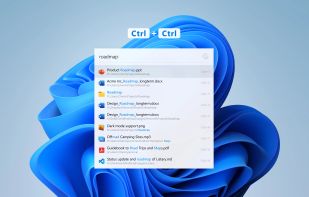
Listary is a revolutionary search utility for Windows that makes finding your files and launching applications blazing fast, for casual and power users alike!.

Cost / License
- Freemium (Pay once)
- Proprietary
Application typeApplication types
Platforms
- Windows
- PortableApps.com
- File Explorer


Features


Listary News & Activities
Highlights All activities
Recent News
No news, maybe you know any news worth sharing?
Share a News TipRecent activities
 ProtagonistLabs added Listary as alternative to Lume Launcher
 pcfan added Listary as alternative to Flash Launch
 ry_dev added Listary as alternative to WinLauncher Standard
 Danilo_Venom added Listary as alternative to BeaconFind, Pronto Search, FilesDesk and PixaFind
- jonathanjewell liked Listary



Featured in Lists

After a fresh Windows installation, new users might get frustrated by the weakness of the default Microsoft apps. So,...
List by Malaz YI with 43 apps, updated

Master List of all Apps and Software I use for both work and personal life.
List by Jimmy Briggs with 416 apps, updated

Useful apps for Windows Additional...
List by tbdsch with 77 apps, updated
What is Listary?
Listary information
Developed by
 Bopsoft
 Licensing
Proprietary and Freemium product.Pricing
One time purchase (perpetual license) that costs $20 + free version with limited functionality.Rating
Average rating of 4.3Alternatives
138 alternatives listedBadge
Get an embeddable badge for ListarySupported Languages


Comments and Reviews
This is a really nice app that makes your browsing of folders quicker - just start typing! - I use this app all the time!
Update here 11 years later: I still use it all the time - we are definitely at 5 stars now!
Launches instantly! Excellent search engine. Unfortunately, I cannot seem to select a collection of files from one of its results and copy them all together, or do anything else with them collectively. I can do this with Everything.
I put only 3 stars for the moment and may change this but Listary’s development is very unusual. I pay for Pro version (dec 2022) and features listed on site’s page… don’t exist for the moment ! The most evident is theming
Listary is a very interesting (and ambitious) search/launch utility. It can be integrated in your favorite files manager (XYplorer for me), you can use it Windows Explorer, you can speed Open file action in every program with Explorer synchronization. You can add shortcuts for files or programs or use Fuzzy Search. You can manage a Favorites list and call it everywhere through a shortcut. You can preview images. Pro version added more advanced search - files in a chosen directory by example.
The Bad : documentation is not complete for v6 and you need the forum to discover how it works. You need some learning to master the features. 230 Mo Memory used (35 Mo for Keypirinha) Some announced Pro features are not implemented for the moment (Quick Move a file, it sounds so nice)
If the developer manages to put all announced features, Listary will be a very handy tool that deserves five stars. For the moment, it’s an interesting search utility with some original features. I put only 3 stars because it’s the first time (and I’m an old man) that I see a program that don’t embark all the features promised on site’s page.
The file preview feature in Listary was introduced in version 6.3.0.65 beta, released on February 9, 2024.
To preview an image in Listary, use the Alt + P keyboard shortcut.
You can find any file instantly, or go immediately to a folder in a file browser. You can assign hotkeys to go to a specific folder in the windows explorer, or to execute commands. I couldn't live without it. It's a productivity booster beast.
Listary is great for quickly finding files/launching programs.. However, they don't allow using anything other than the operation drive in the free version, and most of my searching is from a usb drive, so I switched to another launcher. The preview image feature is nice, though requiring remembering the keyword Alt + P. Flow Launcher has that ability by pressing F1. Another uncommon feature may be the option to edit with VS code.
Does it have a web server, like Everything?
Great in many aspects and a great alternative for those coming from macOS using the best launcher on that platform, Launchbar. Let's hope development on Listary may continue some day soon.